Ultrareview: Intelligent PR Review and Risk-Based Approval
Ultrareview brings together CloudAEye's code review and Review Intelligence capabilities into a single, comprehensive change assessment. Instead of running multiple commands individually, developers can execute one command to evaluate code quality, security, architectural integrity, behavioral changes, and merge risk. For pull requests that do not qualify for automatic approval, Ultrareview also automatically assigns human reviewers.
Ultrareview orchestrates multiple specialized AI-powered analyses and combines their results into a unified report. It determines whether a change qualifies for automatic approval or requires human review. When human review is required for a pull request, Ultrareview automatically assigns the most appropriate reviewers based on code ownership, expertise, and review workload. The maximum number of human reviewers to assign is configurable.
Ultrareview helps engineering teams maintain software quality and security while accelerating development with AI coding agents.
Key Benefits
- Comprehensive Code Assessment: Run bug detection, security analysis, AI slop detection, risk assessment, architecture review, and control-flow analysis in one execution.
- Intelligent Merge Decisions: Evaluate code quality, security findings, architectural violations, and historical risk signals to determine whether a change is suitable for merging.
- AI-Generated Code Quality: Identify low-quality AI-generated code, including hallucinated APIs, duplicated logic, dead code, missing tests, and unnecessary abstractions.
- Automatic Human Reviewer Assignment: Identify changes that require additional scrutiny and automatically assign the appropriate number of human reviewers.
- Architectural Integrity: Detect architectural violations, dependency issues, unintended integration boundaries, and potential cross-repository impact.
- Behavioral Change Analysis: Visualize how code changes affect function and service call sequences, making unintended behavioral changes easier to identify.
- Task Validation: Verify that uncommitted changes satisfy the requirements of a Jira issue, GitHub issue, or provided task description.
- Efficient Execution: Reuse existing analysis results instead of running the same checks repeatedly.
Top Use Cases
1. Comprehensive Review Before Merging a Pull Request
Run a complete assessment of a pull request before requesting human approval or merging it.
Ultrareview combines bug detection, security analysis, AI slop scoring, risk assessment, architecture review, control-flow analysis, and PR hygiene checks to provide a comprehensive view of the proposed changes.
Outcome: Understand whether a pull request is ready to merge or needs additional investigation and human review.
2. Validate AI-Generated Code
AI coding agents can generate substantial amounts of code quickly, but generated code may contain hallucinated APIs, duplicated logic, unnecessary abstractions, missing tests, and other quality issues.
Ultrareview evaluates code quality using multiple signals and identifies potential AI-generated code quality problems.
Outcome: Identify low-quality or overengineered code before it becomes part of the codebase.
3. Identify High-Risk Changes That Need Human Review
Not all code changes carry the same level of risk. A small change to a critical payment or authentication component may require more scrutiny than a much larger change to an isolated utility.
Ultrareview evaluates historical bugs, code rework, ownership, author history, test coverage, and AI slop signals to determine the risk associated with a change.
When human review is necessary for a pull request, Ultrareview automatically assigns reviewers based on code ownership, expertise, and current review workload. The maximum number of reviewers assigned is controlled by the Max human reviewers to assign configuration property.
Outcome: Direct human attention toward changes with the highest potential impact and automatically route them to the right reviewers.
4. Detect Architectural Violations and Dependency Risks
Code changes can introduce architectural violations, unexpected dependencies, circular imports, or dependencies that bypass established application layers.
Ultrareview evaluates how changes affect the existing architecture, repository boundaries, and dependencies.
Outcome: Identify architectural problems and potential integration issues before they become difficult to resolve.
5. Detect Unintended Behavioral Changes
A code diff does not always reveal how an implementation changes application behavior. Moving a function call into a loop or changing the execution path can introduce significant behavioral differences.
Ultrareview compares before-and-after control-flow diagrams to identify calls that were added, removed, redirected, or moved.
Outcome: Understand the behavioral impact of a change and identify unintended changes in execution paths.
6. Validate Changes Against Requirements
Developers frequently implement changes based on Jira tickets, GitHub issues, or other requirements.
Ultrareview can validate uncommitted changes against a specified task to identify missing functionality, incomplete requirements, and implementation gaps.
Outcome: Catch discrepancies between the requested functionality and the actual implementation before creating a pull request.
7. Prioritize Human Review Based on Risk
Engineering teams often have limited reviewer capacity. Assigning every pull request the same level of scrutiny is inefficient.
Ultrareview evaluates the change's risk and, when additional human review is required for a pull request, automatically assigns reviewers who have relevant code ownership and manageable review queues. The maximum number assigned is controlled by Max human reviewers to assign.
Outcome: Improve reviewer utilization while ensuring that high-risk changes receive appropriate attention.
How Ultrareview Works
Ultrareview orchestrates multiple specialized analyses in a defined execution sequence. Each analysis runs once per change, and results from previous executions are reused whenever applicable.
Execution Workflow
Run the following command in a supported coding agent:
/cloudaeye:ultrareview
@cloudaeye /ultrareview
Ultrareview executes the following checks in order:
| Order | Analysis | Command | Purpose |
|---|---|---|---|
| 1 | PR Checklist | /cloudaeye:check |
Runs the configured PR checklist using CloudAEye's 75+ pre-built checks to validate pull request hygiene and report unit-test coverage. |
| 2 | Bugs | /cloudaeye:review |
Identifies potential bugs and correctness issues. |
| 3 | Security | /cloudaeye:security |
Identifies security vulnerabilities and leaked secrets. |
| 4 | AI Slop Score | /cloudaeye:slop-score |
Evaluates code quality and identifies low-quality implementation patterns. |
| 5 | Risk Score | /cloudaeye:risk-score |
Assesses change risk and determines the review recommendation. |
| 6 | Architecture Review | /cloudaeye:review-arch |
Evaluates architectural integrity and dependency changes. |
| 7 | Control Flow Analysis | /cloudaeye:control-flow |
Analyzes changes to function and service call sequences. |
| 8 | Task Check | /cloudaeye:check-task |
Validates changes against specified requirements. |
| 9 | Human Reviewer Assignment | /cloudaeye:assign-reviewer |
Automatically assigns human reviewers when a pull request does not qualify for automatic approval. The maximum number assigned is controlled by configuration. |
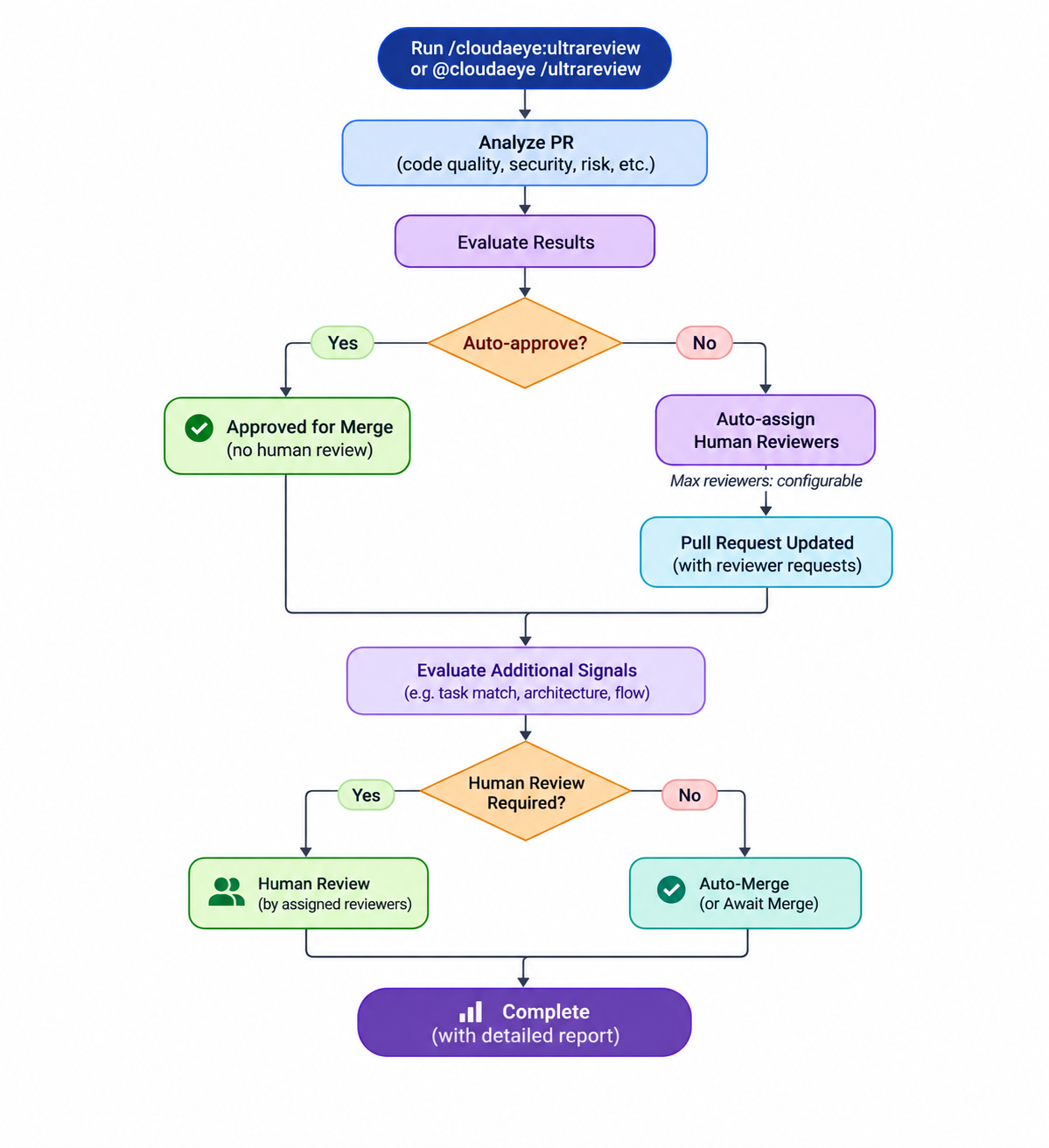
Flow Diagram
This diagram represents the logical high-level workflow.
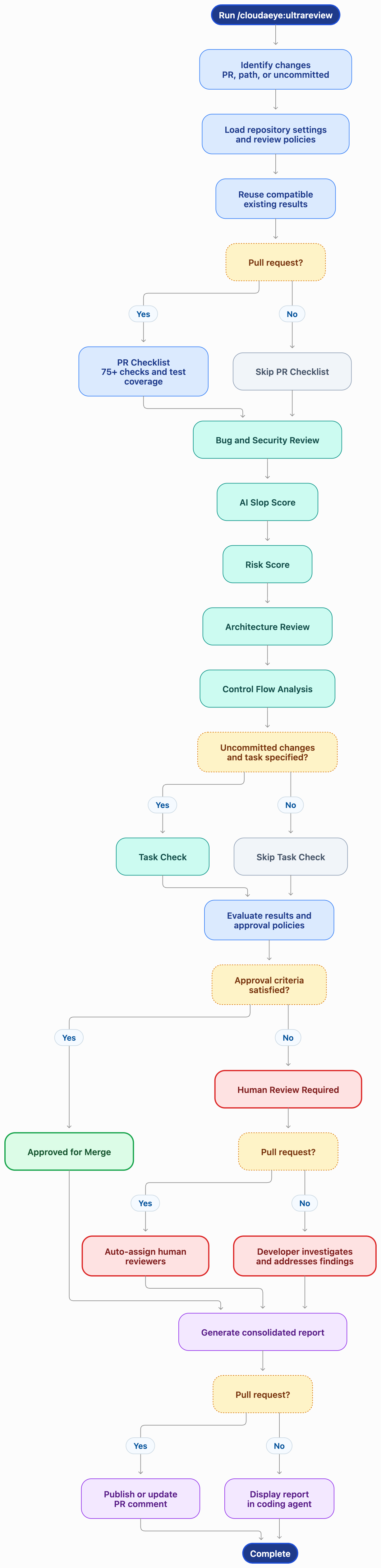
Here is the detailed worlflow. Disabled checks are skipped according to repository settings, and compatible results from previous executions are reused rather than executed again.
Execution Conditions
- The PR Checklist runs only for pull requests because it requires PR context.
- Bugs and Security are two parts of the same review execution, not separate review runs.
- Task Check runs only when a task is specified and applies only to uncommitted changes.
- Human reviewer assignment runs only when a pull request does not qualify for automatic approval. It is skipped for uncommitted changes and path-based reviews.
- Checks disabled in repository settings are skipped.
- The execution report identifies which checks ran, which were skipped, and which results were reused.
Intelligent Result Reuse
Ultrareview avoids redundant analysis by reusing existing results for the same code change.
For example, if you previously ran /cloudaeye:slop-score or /cloudaeye:review, Ultrareview reuses those results when they are compatible with the current review.
Each analysis runs only once for a given change. If the code changes, the relevant analyses run again.
This approach reduces redundant LLM calls, execution time, and unnecessary processing.
Running Ultrareview
Always use the fully qualified command:
/cloudaeye:ultrareview
Important: Do not use /ultrareview in Claude Code. That is Claude Code's own command. CloudAEye Ultrareview is invoked explicitly using /cloudaeye:ultrareview and is never started automatically by Claude Code.
In GitHub, use the following:
@cloudaeye /ultrareview
Command Examples
1. Review all uncommitted changes
/cloudaeye:ultrareview
Analyzes all uncommitted changes in your working tree.
2. Review changes in a specific directory
/cloudaeye:ultrareview src/auth/
Limits the assessment to changes under the specified path.
3. Review a pull request
/cloudaeye:ultrareview #412
Analyzes pull request 412, including the PR checklist and risk assessment.
4. Review only high and critical findings
/cloudaeye:ultrareview --high
Limits the bug and security review findings to High and Critical severity.
5. Validate changes against a task
/cloudaeye:ultrareview task:PROJ-123
Validates uncommitted changes against Jira issue PROJ-123.
You can also provide a GitHub issue URL or plain-text task description.
Supported Options
| Option | Description |
|---|---|
--critical |
Reports Critical findings only. |
--high |
Reports High and Critical findings. |
--medium |
Reports Medium, High, and Critical findings. |
--low |
Includes all supported severity levels. |
--model |
Specifies the LLM model for the review. |
--model-provider |
Specifies the LLM provider for the review. |
--invert-model |
Configures model inversion for the review. |
task: |
Specifies a task or issue to validate against uncommitted changes. |
Severity filters apply to the bug and security review. When a severity filter is specified, AI Slop Score runs its own analysis rather than reusing a severity-filtered review.
Model options apply to the review execution only and do not change your repository's default LLM configuration.
Understanding the Ultrareview Report
Ultrareview consolidates the results into four major sections.
1. Executive Summary
The report starts with one of two overall recommendations:
- Approved for Merge: The change satisfies the configured approval criteria and does not require additional human review.
- Requires Human Review: The change has findings or conditions that require human investigation before merging.
The summary explains the reasons behind the recommendation.
For pull requests requiring human review, Ultrareview automatically assigns reviewers and reports who was assigned, along with a brief explanation of why each reviewer was selected.
The reviewer assignment details include:
- Relevant code ownership and expertise.
- Current review workload.
- Areas of focus for each assigned reviewer.
- Reasons for selecting each reviewer.
The detailed reviewer rationale is available in a collapsible section.
Note: An Approved for Merge recommendation is an assessment result. Ultrareview does not automatically merge the pull request or submit a GitHub approval. When human review is required, assigned reviewers are requested on the pull request; assignment does not approve or merge the change.
2. Analysis Results
This section provides a consolidated status for every review criterion.
| Criterion | What It Evaluates |
|---|---|
| Bugs | Potential correctness issues and implementation defects. |
| Security | Security vulnerabilities, insecure implementation patterns, and leaked secrets. |
| AI Slop Score | Code quality signals and low-quality implementation patterns. |
| Risk Score | Historical and contextual risk associated with the change. |
| PR Checklist | Pull request hygiene and unit-test coverage. |
| Architecture | Architectural integrity, layers, dependencies, and integration boundaries. |
| Control Flow | Changes to function and service call sequences. |
| Task Check | Alignment between implementation and specified requirements. |
The report distinguishes between different execution states:
- Completed: The analysis ran successfully.
- Reused: Existing results were used instead of running the analysis again.
- Not Applicable: The criterion does not apply to the current change.
- Not Run: The analysis was expected but did not execute.
- Turned Off: The check was disabled in repository settings.
This makes it easy to understand exactly what was evaluated and what remains unverified.
3. Recommended Next Actions
Ultrareview provides a prioritized list of recommended actions based on the analysis results.
Recommendations may include:
- Fixing critical bugs or security vulnerabilities.
- Addressing architectural violations.
- Improving code quality and removing unnecessary abstractions.
- Adding missing unit tests.
- Investigating high-risk files or components.
- Completing missing task requirements.
- Requesting additional human review.
Each recommendation references the relevant finding or report section.
The report includes up to five prioritized actions to help developers focus on the most important issues first.
4. Detailed Analysis
Each individual analysis is available in its own collapsible section.
Code Review
Includes all bug and security findings, with:
- Finding severity and description.
- Detailed explanation of the issue.
- Affected files and line numbers.
- Supporting evidence and recommendations.
PR Checklist
Includes:
- Individual checklist results.
- Status and details for each check.
- Unit-test coverage, including function-level coverage when available.
- The complete checklist report.
AI Slop Score
Includes:
- Overall score out of 100.
- Code quality review band.
- Nine code-quality signals.
- Detailed findings and affected files.
- Analysis coverage and supporting evidence.
Risk Score
Includes:
- Overall risk score and risk band.
- Risk assessment and recommendation.
- Historical bugs and regression trends.
- Code rework and ownership information.
- Author history and test coverage.
- Prioritized risk concerns.
Architecture Review
Includes:
- Architecture review verdict.
- Architecture diagrams.
- Repository layers and components.
- Dependency changes and architectural violations.
- Cross-repository impact.
- Questions requiring further engineering review.
Control Flow Analysis
Includes:
- Before-and-after sequence diagrams.
- Added, removed, redirected, and moved calls.
- Changes to execution paths.
- Affected callers and cross-repository impact.
Task Check
Includes:
- Task requirements.
- Validation results.
- Missing or incomplete requirements.
- Implementation gaps and recommended actions.
The individual reports retain the detailed information produced by their respective commands, including diagrams where available.
Approval and Human Review Policy
Ultrareview uses repository-level settings to determine whether a change can receive an Approved for Merge recommendation or requires human review.
The approval decision considers:
- Risk assessment and configured risk thresholds.
- AI Slop Score and configured quality thresholds.
- Critical bug and security findings.
- Architectural review results.
- Task validation results, when applicable.
- Custom human review instructions.
Conditions Requiring Human Review
A change requires human review when any applicable approval condition is not satisfied.
Examples include:
- Risk or AI Slop Score exceeds configured hard limits.
- A leaked secret is detected.
- A Critical finding is reported.
- An architectural failure is detected.
- A specified task remains incomplete.
- Repository instructions explicitly require human review.
- Risk cannot be assessed because insufficient evidence is available.
Some conditions, such as leaked secrets and Critical findings, require human review regardless of configured score thresholds.
Hard Limits
Repository settings define the maximum risk score, AI Slop Score, and review finding severity that can be accepted for automatic approval recommendations.
Changes exceeding these limits require human review.
Human Review Instructions
Teams can define additional review requirements using plain-language instructions.
For example:
Changes under services/payments/ always need two human reviewers.
Changes to authentication and authorization require security review.
These instructions can require additional reviewers but cannot weaken the configured approval policy.
When an instruction applies, Ultrareview identifies the instruction and explains how it affected the decision.
Reviewer Assignment
When a pull request does not qualify for automatic approval, Ultrareview automatically assigns human reviewers based on code ownership, expertise, and review workload.
The Max human reviewers to assign configuration property controls the maximum number of reviewers assigned. Ultrareview reports the assigned reviewers and the rationale for selecting them.
Assigned reviewers are requested on the pull request. Developers can still use /cloudaeye:assign-reviewer separately when they want to initiate reviewer assignment outside the Ultrareview workflow.
Configuring Ultrareview
See the Ultrareview Settings UI Reference and Config File Reference for the complete list of supported settings.
You may use repository-level settings to control which analyses run and how approval decisions are made.
Configure these settings using:
/cloudaeye:config
The settings are maintained in the repository and are applied when Ultrareview runs.
1. Checks
You can enable or disable individual checks.
A disabled check is skipped, and the report identifies it as turned off in repository settings.
Bugs and Security are configured independently but share a single review execution.
Disabling any of the following checks prevents Ultrareview from issuing an Approved for Merge recommendation:
- Bugs
- Security
- AI Slop Score
- Risk Score
2. Approval Thresholds
Configure the maximum acceptable values for:
- Risk Score.
- AI Slop Score.
- Review finding severity.
Changes exceeding the configured limits require human review.
Hard safety conditions, including leaked secrets and Critical findings, cannot be overridden by these thresholds.
3. Human Review Policy
Configure Max human reviewers to assign to set the maximum number of human reviewers Ultrareview assigns when a pull request does not qualify for automatic approval. Reviewer selection considers code ownership, expertise, and current review workload.
You can also provide plain-language instructions describing additional review requirements.
For example:
All changes under services/payments/ must be reviewed by at least two engineers.
The policy can require more reviewers but cannot reduce the required level of review.
4. LLM Configuration
Configure the LLM provider and model used for code review.
CloudAEye supports its managed LLM configurations as well as your own LLM provider credentials, depending on your account configuration.
You can also override the model for an individual Ultrareview execution using the supported model options.
Pull Request Settings
For pull requests, Ultrareview reads repository settings from the target branch (the branch into which the pull request will merge).
Working with Pull Requests
When Ultrareview runs against a pull request, it publishes the consolidated report as a single pull request comment.
- The main Ultrareview report is maintained as one comment.
- Subsequent executions update the existing report instead of creating duplicate comments.
- The PR Checklist maintains its own comment, consistent with
/cloudaeye:check. - Assigned reviewers are requested on the pull request.
- The number of reviewers assigned is limited by the
Max human reviewers to assignconfiguration property. - No reviewers are assigned when the pull request qualifies for automatic approval.
To run reviewer assignment independently of Ultrareview, use:
/cloudaeye:assign-reviewer #412
Replace 412 with the relevant pull request number. This standalone command is useful when you want to assign reviewers outside the Ultrareview assessment workflow.
For uncommitted changes or a specific directory, Ultrareview displays the report in the coding agent without posting a pull request comment.
Important Execution Details
Uncommitted Changes
When running Ultrareview against uncommitted changes:
- The PR Checklist is skipped because there is no pull request.
- Bug and security reviews still run.
- AI Slop Score and Risk Score still run.
- Risk assessment uses the current developer as the author.
- Unit-test coverage is reported as not measured.
- Architecture and Control Flow analyses still run.
- Human reviewer assignment is skipped because there is no pull request to assign reviewers to.
- Task Check runs only when a task is specified.
Path-Based Reviews
When a directory or file path is provided, Ultrareview limits its assessment to the changes under that path.
The PR Checklist is skipped because it requires a pull request. Human reviewer assignment is also skipped because the review is limited to a path and is not being run against a pull request.
Repeated Execution
Ultrareview reuses compatible results from previous executions against the same change, including results from individual CloudAEye commands.
If the underlying code changes, the relevant analyses run again.
The report identifies reused results so developers can distinguish new analysis from previously generated evidence.
Severity Filters
Severity filters narrow the bug and security review findings.
For example:
/cloudaeye:ultrareview --high
This reports High and Critical findings.
Because a severity-filtered review does not provide the complete evidence needed by AI Slop Score, the slop analysis runs independently rather than reusing the filtered review.
What Ultrareview Does Not Include
Ultrareview focuses on assessing code changes and determining their review requirements. Some CloudAEye commands serve different purposes and are intentionally excluded.
| Command | Purpose |
|---|---|
/cloudaeye:describe |
Explains a pull request or code change. |
/cloudaeye:ask |
Answers questions about the codebase. |
/cloudaeye:implement |
Implements requested code changes. |
/cloudaeye:add-docs |
Suggests or generates documentation updates. |
/cloudaeye:add-tests |
Suggests or generates additional tests. |
/cloudaeye:triage-prs |
Helps prioritize which pull requests should be reviewed next. |
/cloudaeye:assign-reviewer |
Assigns or requests human reviewers independently of the Ultrareview workflow. |
These commands can be used separately when needed.
Recommended Workflow
For AI-assisted development, we recommend incorporating Ultrareview into the development workflow before requesting human review.
- Implement: Use your preferred AI coding agent to implement the requested change.
- Validate: Run Ultrareview to evaluate code quality, security, risk, architecture, and behavioral changes.
- Fix: Address the critical findings and recommended improvements.
- Reassess: Run Ultrareview again to evaluate the updated changes.
- Create or Update PR: Push the changes and create or update the pull request.
- Review: If Ultrareview does not approve the pull request automatically, it assigns human reviewers according to the
Max human reviewers to assignconfiguration. The assigned engineers can then review the change. - Merge: Proceed with the normal team approval and merge process.
This workflow helps engineering teams move faster with AI coding agents without compromising software quality, security, or architectural integrity.