Checkstyle
This guide explains how to run Checkstyle with CloudAEye.
Overview
Checkstyle is a static code analysis tool for Java that helps enforce coding standards, improve code quality, and maintain consistency across a codebase.
It enables teams to define and enforce a custom set of style rules such as naming conventions, class and method design, whitespace usage, and Javadoc requirements.
Checkstyle is highly configurable via an XML-based configuration, allowing you to tune severity, modules, and filters according to your team’s needs.
Prerequisites
Step 1: Register
Sign up with CloudAEye SaaS.
Step 2: Setup Code Review
Setup Code Review by following the Getting Started guide.
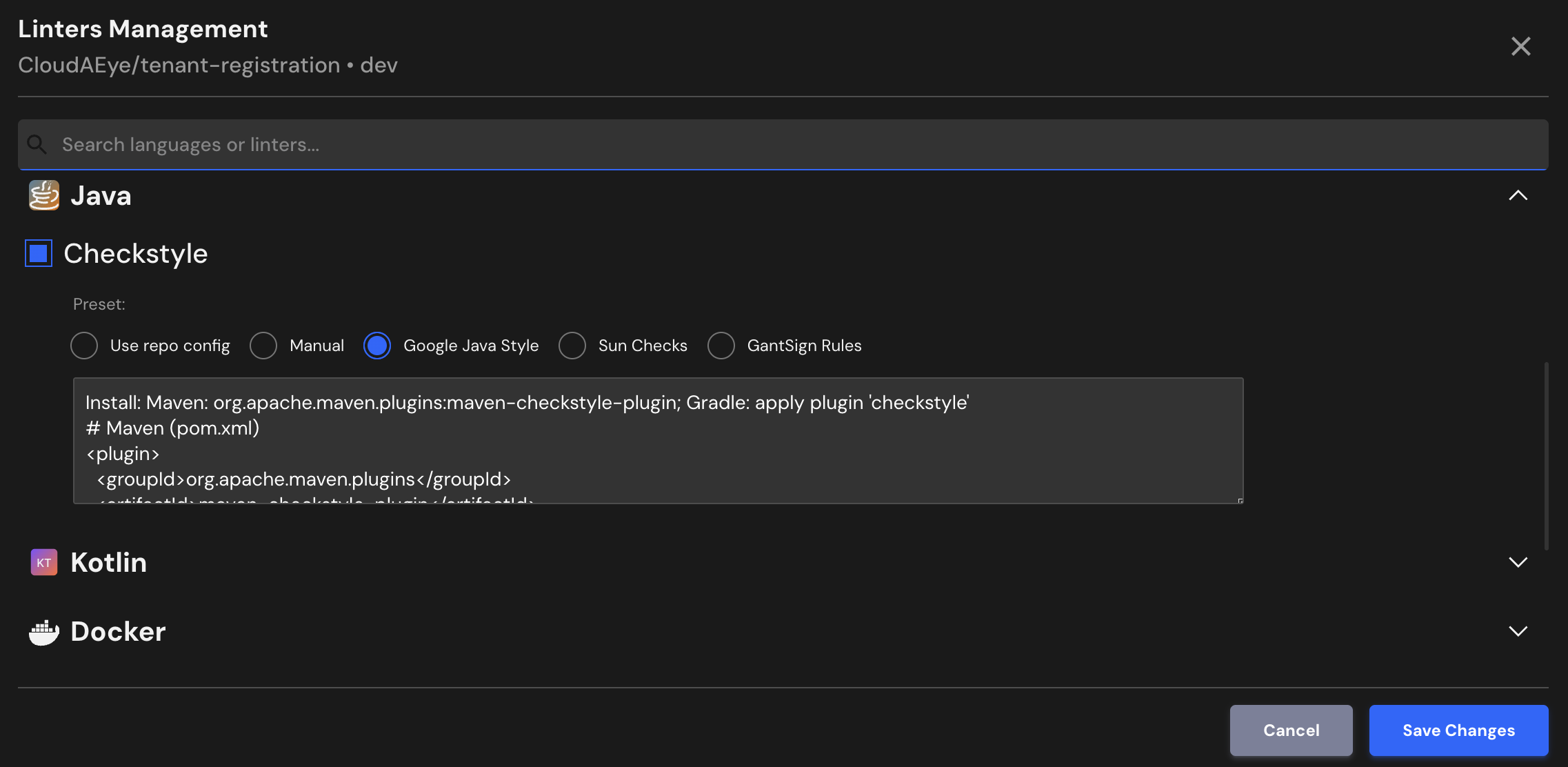
Step 3: Configure the Linter
Configure the desired linter.
Configuration
CloudAEye provides a best practices configuration for Checkstyle.
If your repository already has Checkstyle configured, CloudAEye will automatically use that setup. You may also enter your desired configuration.
Essential Checks to Include
- Imports: Enforce sorted, non-star imports; no unused, redundant imports.
- Naming conventions: Enforce naming rules for classes, methods, variables, constants, etc.
- Javadoc: Require method, class, and field documentation comments; enforce summary sentence and tag order.
- Whitespace and line length: Limit maximum line length, eliminate trailing whitespace, require single blank lines between class elements.
- Brace style: All control statements and class/method blocks must use braces and consistent indentation.
- Complexity: Check for cyclomatic complexity, class/method length, and nested blocks, keep methods and classes short and simple.
- Boolean returns: Simplify return statements by avoiding unnecessary if/else blocks returning boolean values.
Use repo config
CloudAEye automatically reads your repository’s existing Checkstyle configuration and uses it as is. No additional setup is needed.
Common Checkstyle Configuration File Locations & Formats
Checkstyle configurations are typically defined in an XML configuration file, usually named:
checkstyle.xml, orgoogle_checks.xml/sun_checks.xml(when using built-in style guides)
Where the file lives
You commonly place the Checkstyle configuration in one of the following locations:
- At the root of the repository (most common)
- Inside a build-tool directory, such as:
config/checkstyle/for Gradlecheckstyle/under your project structure for Maven
For more details, see the Checkstyle config overview: config.html on the Checkstyle site.
Manual
You may enter the Checkstyle configuration you would like to use.
Google Java Style
Install: Maven: org.apache.maven.plugins:maven-checkstyle-plugin; Gradle: apply plugin 'checkstyle'
# Maven (pom.xml)

  org.apache.maven.plugins
  maven-checkstyle-plugin
  3.3.1

    https://raw.githubusercontent.com/checkstyle/checkstyle/master/src/main/resources/google_checks.xml
    UTF-8
    true
    true


# Gradle (build.gradle)
checkstyle {
  config = resources.text.fromUri('https://raw.githubusercontent.com/checkstyle/checkstyle/master/src/main/resources/google_checks.xml')
  toolVersion = '10.18.1'
}
Refer to detailed configuration here.
Sun Checks
Install: Maven/Gradle as above; point to the Sun checks XML.
# Maven (pom.xml)

  org.apache.maven.plugins
  maven-checkstyle-plugin
  3.3.1

    https://raw.githubusercontent.com/checkstyle/checkstyle/master/src/main/resources/sun_checks.xml
    UTF-8
    true
    true


# Gradle (build.gradle)
checkstyle {
  config = resources.text.fromUri('https://raw.githubusercontent.com/checkstyle/checkstyle/master/src/main/resources/sun_checks.xml')
  toolVersion = '10.18.1'
}
Refer to detailed configuration here.
GantSign Rules
Install: Maven/Gradle supported; reference the GantSign rules URL.
# Maven (pom.xml)

  org.apache.maven.plugins
  maven-checkstyle-plugin
  3.3.1

    https://raw.githubusercontent.com/gantsign/checkstyle-config/master/checkstyle.xml
    UTF-8
    true
    true


# Gradle (build.gradle)
checkstyle {
  config = resources.text.fromUri('https://raw.githubusercontent.com/gantsign/checkstyle-config/master/checkstyle.xml')
  toolVersion = '10.18.1'
}
Refer to project and detailed configuration to learn more.
File Extensions
Checkstyle will run on files that use any of the following extensions:
.java
References
- Checkstyle Google's Style
- Checkstyle Sun's Style
- Checkstyle project
- Checkstyle documentation