Describe Pull Request
CloudAEye's Describe PR feature uses AI to generate a clear, structured description of a pull request (PR) based on its code changes and commit history. It helps developers communicate the purpose, scope, and implementation details of their changes without spending time writing descriptions manually.
Use this feature when creating a new PR, improving an existing description, or helping reviewers understand complex changes.
Overview
A good PR description helps reviewers understand what changed, why it changed, and what they should pay attention to during review. However, developers often create PRs with incomplete descriptions or rely on commit messages that do not adequately explain the overall change.
CloudAEye automates this process by analyzing the PR's code changes and available commit information to generate a structured description.
The generated description can include:
- PR title: A concise title that summarizes the change.
- Description: An overview of the purpose and scope of the changes.
- Change summary: A summary of the key modifications and affected files.
- Implementation details: Important technical details about the changes, where supported by the available context.
- Additional considerations: Relevant testing, documentation, compatibility, or follow-up considerations identified from the changes.
The content of the generated description depends on the code changes and the information available in the PR.
Use Cases
1. Generate Descriptions for PRs with Missing or Incomplete Information
Developers sometimes open PRs with an empty description or a brief note that does not explain the changes adequately.
CloudAEye can generate a detailed description from the code changes and commit history, giving reviewers the context they need to understand the proposed changes.
Example: A developer submits a PR titled Update data processing without explaining the implementation details. CloudAEye generates a description covering the main changes, affected components, and relevant technical considerations.
Benefit: Improve PR documentation without requiring developers to write descriptions from scratch.
2. Summarize Multiple Commits into One Coherent Description
A PR may contain multiple commits that implement different parts of a larger change. Individual commit messages may not communicate how those changes fit together.
CloudAEye synthesizes the available change information into a unified description of the PR.
Example: A PR includes commits that add a new data processor, introduce a transformation, update export functionality, and modify related code. CloudAEye summarizes these changes as one cohesive feature rather than presenting an unconnected list of commits.
Benefit: Help reviewers understand the overall purpose of a PR instead of reconstructing it from individual commit messages.
3. Explain Complex or Cross-File Changes
Changes spanning multiple files or components can be difficult to understand from a diff alone.
CloudAEye provides a structured summary of the change and the modifications made to individual files, helping reviewers navigate the implementation.
Example: A PR introduces a new processing module and updates an existing transformer implementation. The generated description explains the new module's purpose and summarizes the related changes to the transformer.
Benefit: Reduce the effort required to understand the scope and structure of complex changes.
4. Improve the Code Review Experience
Reviewers need to understand the intent of a change before evaluating whether its implementation is correct.
A generated PR description provides an initial overview of the changes and helps reviewers identify the areas that deserve closer attention.
Example: A PR modifies data transformation logic, export behavior, and metadata handling. The description organizes these changes into a readable summary, allowing reviewers to understand the scope before examining individual code changes.
Benefit: Give reviewers a useful starting point for code review while preserving the need to inspect the actual diff and validate the implementation.
5. Standardize PR Documentation Across Teams
Teams often have different habits when writing PR descriptions. Some developers provide extensive context, while others include only a short summary.
CloudAEye helps establish a more consistent level of detail by generating structured descriptions for PRs.
Example: An engineering team asks developers to include a clear summary of their changes in every PR. Developers can use CloudAEye to generate an initial description and refine it to meet the team's conventions.
Benefit: Improve consistency and make PRs easier to understand across teams.
Prerequisites
Before using Describe PR:
- Register for CloudAEye.
- Set up Code Review by following the Getting Started guide.
- Ensure the target repository is connected and configured for CloudAEye.
Generate a PR Description
To generate a description for a pull request:
- Open the pull request in your connected repository.
- Add the following comment to the PR conversation:
@cloudaeye /describe
- CloudAEye analyzes the available code changes and commit information.
- Review the generated PR description and make any necessary edits before relying on it as the final description.
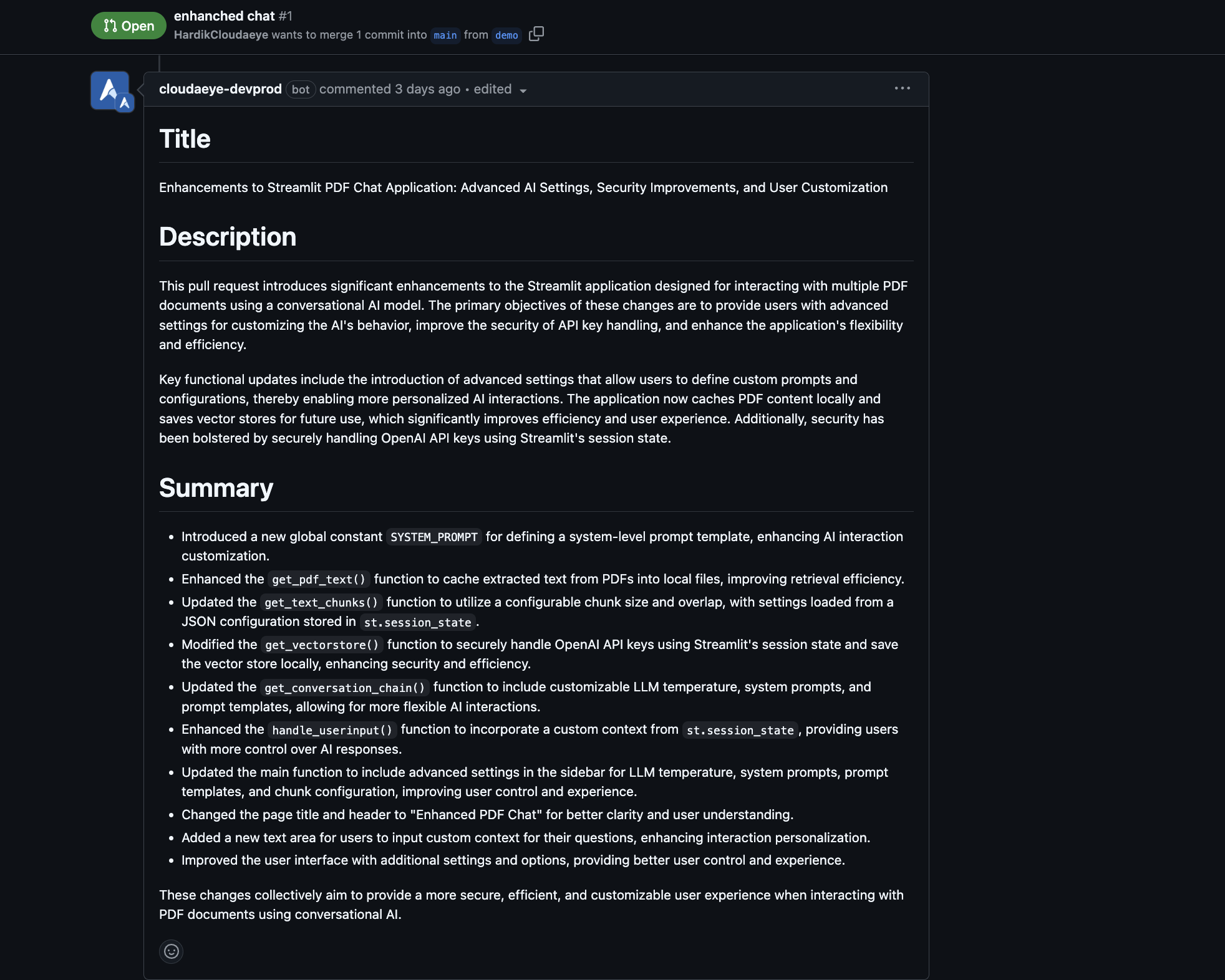
Example
See the CloudAEye example PR to see Describe PR in action.
In this example, CloudAEye generates a structured description for a PR that introduces an enhanced DataFrame processor and extends transformation functionality. The output organizes the changes into sections covering the overall description, summary, and additional information, including relevant implementation and testing considerations.
This illustrates how Describe PR can turn a collection of commits and code changes into a coherent explanation that is easier for reviewers to understand.
Best Practices
- Review the generated description: Treat AI-generated content as a draft. Verify that it accurately represents the code changes.
- Preserve important context: Add business requirements, linked issues, design decisions, or other context that cannot be inferred from the code alone.
- Keep the description aligned with the implementation: Update the PR description if the scope changes during development.
- Use clear commit messages: Descriptive commit messages can provide additional context for generating a useful summary.
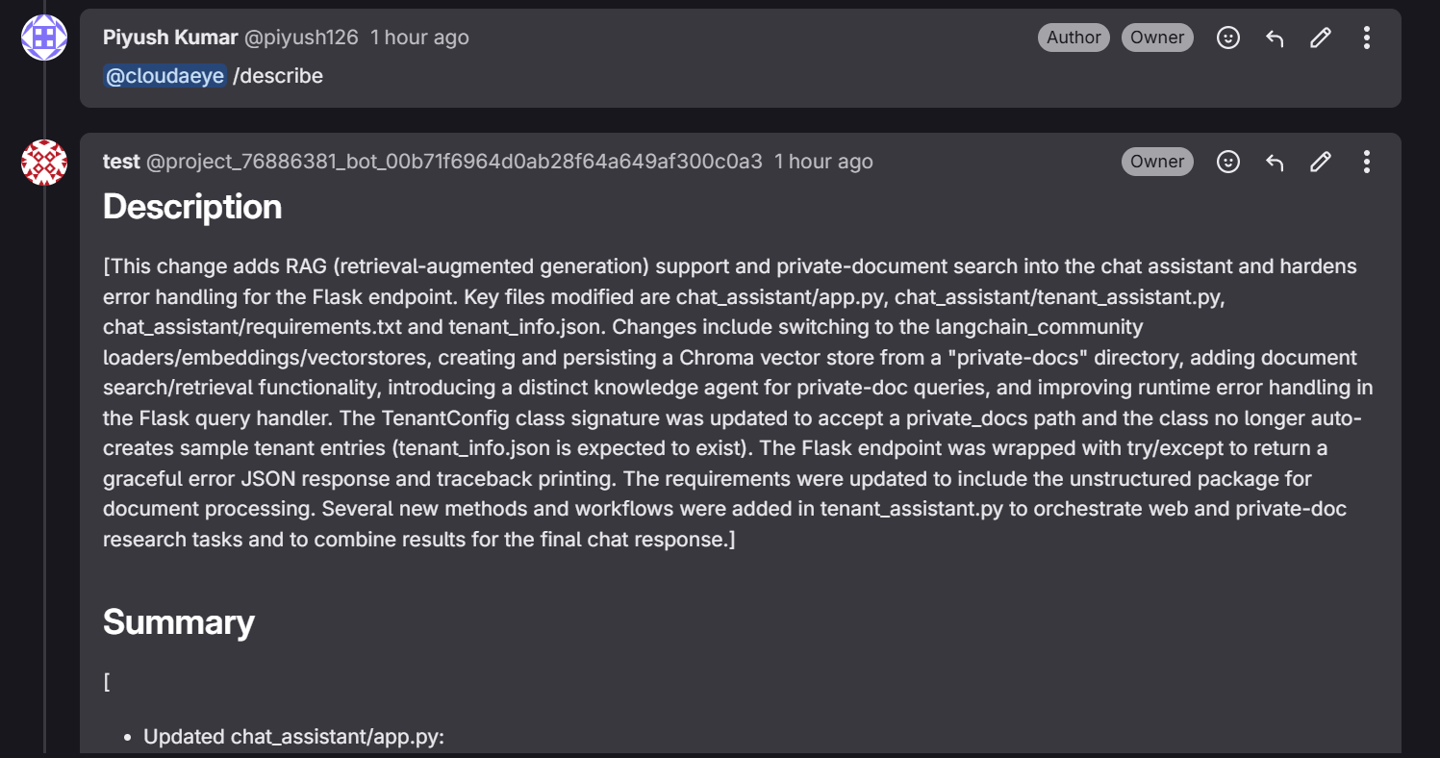
CloudAEye also supports GitLab and Bitbucket. Here is an example from GitLab setup.
Related Features
- Review Code: Analyze code changes for potential bugs and other issues.
- Automated PR Review: Configure automatic code reviews for connected repositories.
- Describe Commits: Generate descriptions for individual commits.