Ruff
This guide explains how to run Ruff with CloudAEye.
Overview
Ruff is an ultra-fast Python linter and code formatter, written in Rust, designed to provide both speed and power.
Highlights
- Lightning-fast performance: Ruff runs 10×–100× faster than many traditional Python linters and formatters like Flake8 or Black.
- All-in-one tool: It merges functionality from multiple tools—such as Flake8 (and many of its plugins), isort, pyupgrade, autoflake, and more—into a single, unified interface.
- Smart configuration: You can configure Ruff through pyproject.toml, ruff.toml, or .ruff.toml.
- Extensive rule set: It includes 800+ built-in linting rules, with native re-implementations of rules from popular linters and plugins (e.g., flake8-bugbear).
Prerequisites
Step 1: Register
Sign up with CloudAEye SaaS.
Step 2: Setup Code Review
Setup Code Review by following the Getting Started guide.
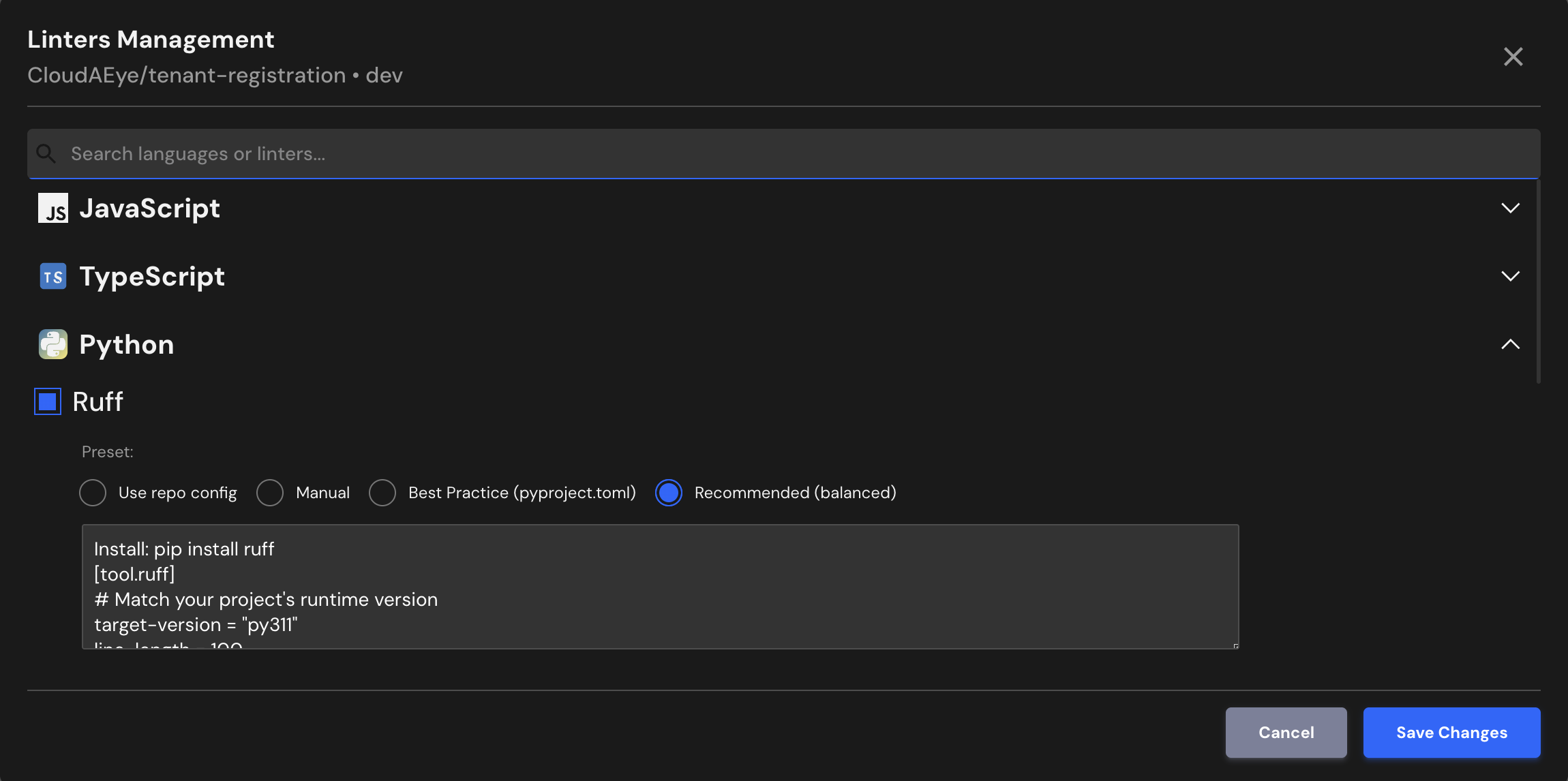
Step 3: Configure the Linter
Configure the desired linter.
Configuration
CloudAEye supports Ruff’s recommended best-practice configuration. If your repository already has Ruff configured, CloudAEye will automatically use that setup.
Use repo config
CloudAEye automatically reads your repository’s existing Ruff configuration and uses it as is. No additional setup is needed.
Common Ruff Configuration File Locations & Formats
Ruff looks for configuration in this order:
** 1. pyproject.toml (recommended) **
This is the most common and preferred location. Example section:
[tool.ruff]
line-length = 88
select = ["E", "F"]
** 2. ruff.toml **
A standalone configuration file dedicated solely to Ruff.
** 3. ruff.ini or ruff.cfg **
INI-style configuration files supported for flexibility.
** 4. setup.cfg **
If your Python project already uses setup.cfg, Ruff can read configuration from a [tool.ruff] section there.
Manual
You may enter the Ruff configuration you would like to use.
Best Practice (pyproject.toml)
Places configuration in pyproject.toml at the project root.
Install: pip install ruff
[tool.ruff]
# Match your project's runtime version
target-version = "py311"
line-length = 100
extend-exclude = [
  "migrations",
  "tests/fixtures",
  "build",
  "dist",
]

# Enable rule sets
select = [
  "E",   # pycodestyle errors
  "F",   # pyflakes
  "I",   # isort import order
  "B",   # bugbear
  "UP",  # pyupgrade
  "N",   # pep8-naming
  "SIM", # simplify
  "RUF", # Ruff-specific rules
]

# Disable rules that are often too strict or stylistic
ignore = [
  "E501", # line length (handled by formatter)
  "B008", # function call as default arg
]

# Automatically fix what can be safely fixed
fix = true
unsafe-fixes = false

[tool.ruff.lint]
unfixable = ["F401"] # unused imports

[tool.ruff.format]
quote-style = "double"
indent-style = "space"
line-ending = "auto"
skip-magic-trailing-comma = false
docstring-code-format = true
Recommended (balanced)
Install: pip install ruff
[tool.ruff]
# Match your project's runtime version
target-version = "py311"
line-length = 100
extend-exclude = [
  "migrations",
  "tests/fixtures",
  "build",
  "dist",
]

# Enable rule sets
select = [
  "E",   # pycodestyle errors
  "F",   # pyflakes
  "I",   # isort import order
  "B",   # bugbear
  "UP",  # pyupgrade
  "N",   # pep8-naming
  "SIM", # simplify
  "RUF", # Ruff-specific rules
]

# Disable rules that are often too strict or stylistic
ignore = [
  "E501", # line length (handled by formatter)
  "B008", # function call as default arg
]

# Automatically fix what can be safely fixed
fix = true
unsafe-fixes = false

[tool.ruff.lint]
unfixable = ["F401"] # unused imports

[tool.ruff.format]
quote-style = "double"
indent-style = "space"
line-ending = "auto"
skip-magic-trailing-comma = false
docstring-code-format = true
File Extensions
Ruff will run on files that use any of the following extensions:
.py
References
- Ruff tutorial
- Ruff configuration
- Ruff project