Code Review - PR Checklist
CloudAEye enables policy-driven enforcement of engineering standards at scale. With the prebuilt PR checklist items across many categories, teams can apply consistent standards to every pull request as the organization grows.
Prerequisites
Step 1: Register
Sign up with CloudAEye SaaS.
Step 2: Setup Code Review
Setup Code Review by following the Getting Started guide.
Initiate a Check
CloudAEye automatically evaluates all selected checklist items during every code review.
To re-run the selected checklist items, add @cloudaeye /check as a comment on the pull request (PR).
Checklist Results
GitHub
In GitHub, checklist results appear under the Checks tab.
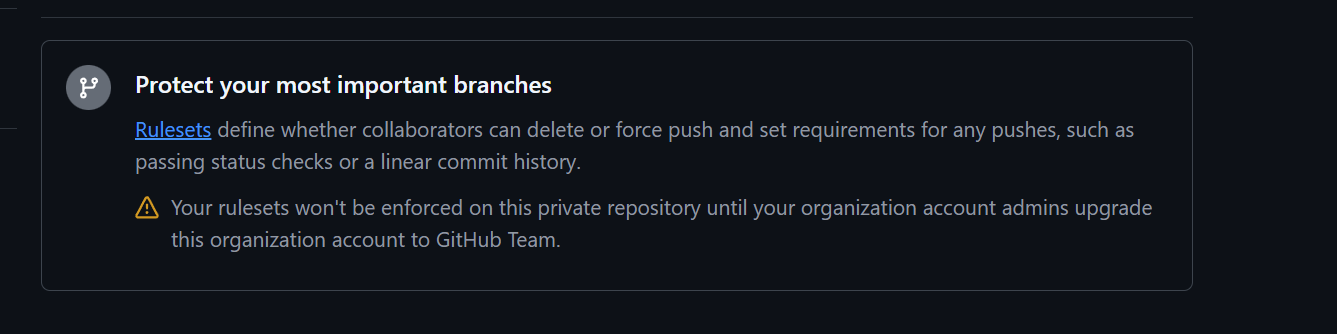
Blocking PR merge on a check failure is supported for any public repo. If you have a private repo, you need to have atleast GitHub Team level subscription.
Users will see a similar warning in GitHub if their subscription is below the Team tier.
This is an example of PR Checklist in github.
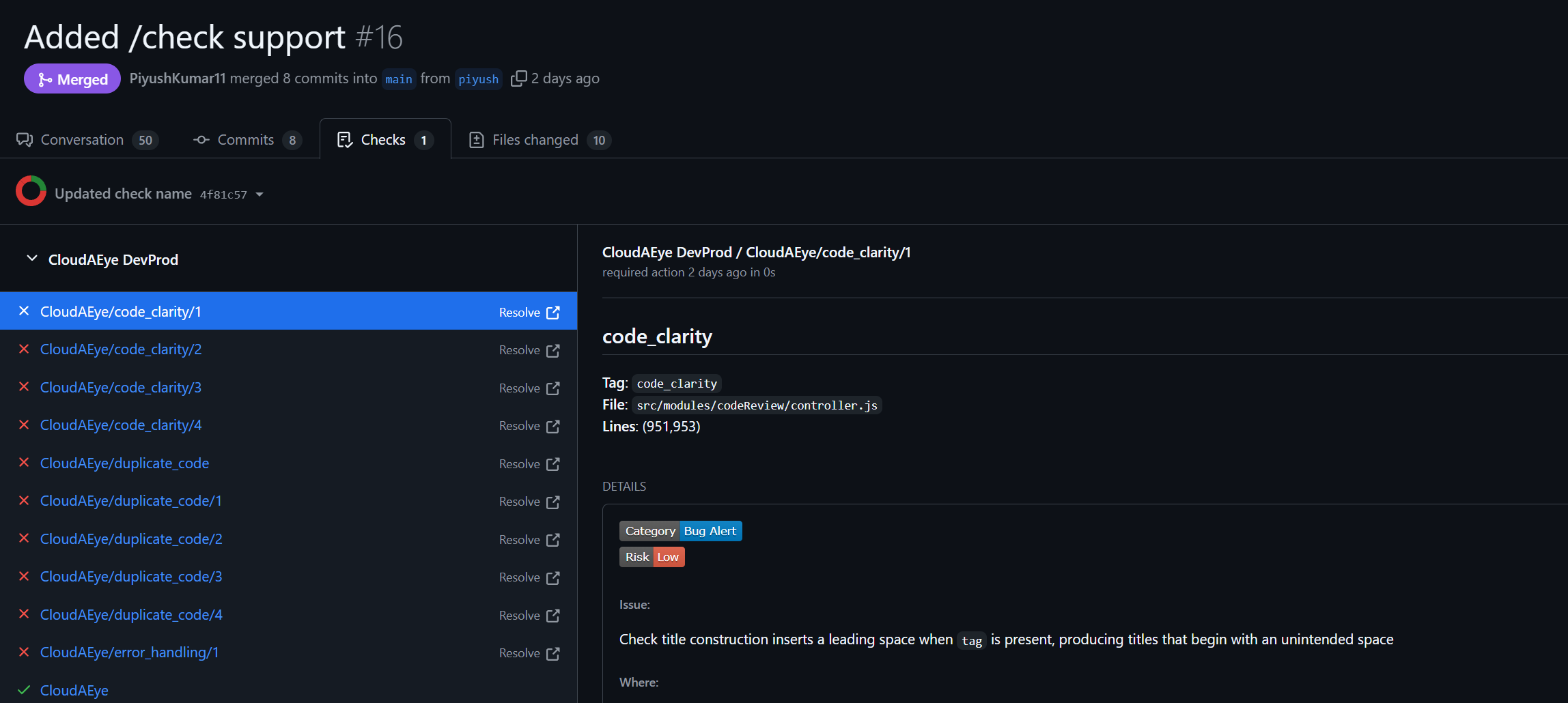
Each entry in the Checks tab correspond to a cheklist failure. The status of a check can be failure or action_required based on the enforcement modes(Warning/Error) you selected for a particular check.
GitLab
In GitLab, checklist failures are reported through the pipeline and jobs.
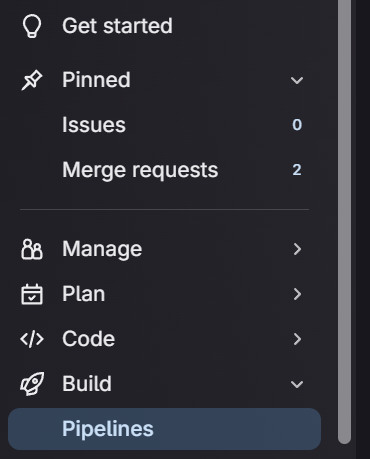
To see the results of checklist, look for the Pipelines option on the left navigation.
Here is an example of pipeline in Gitlab:
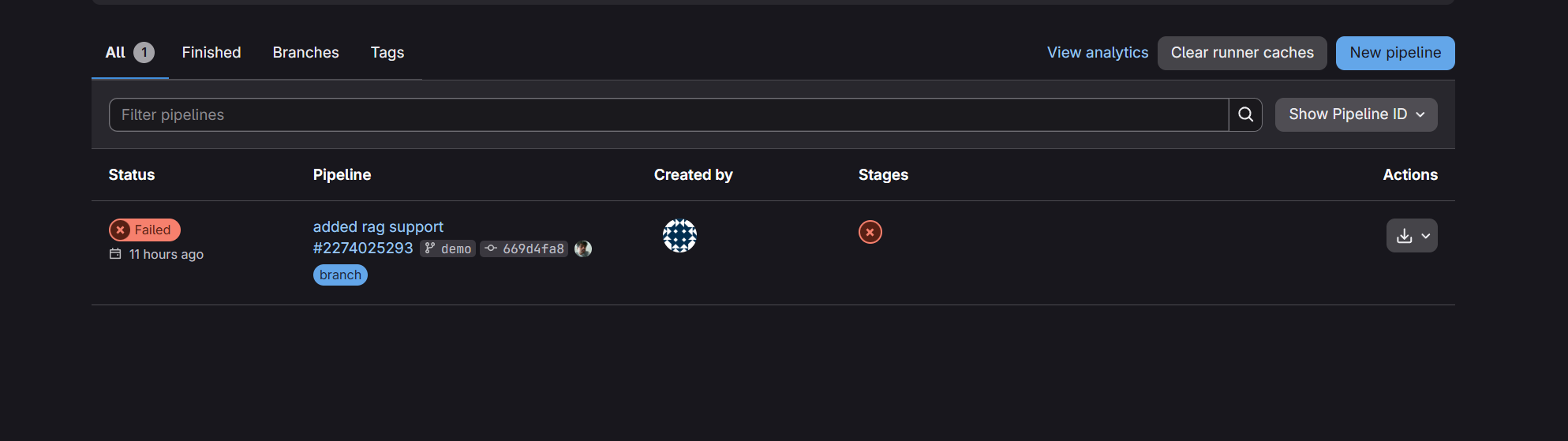
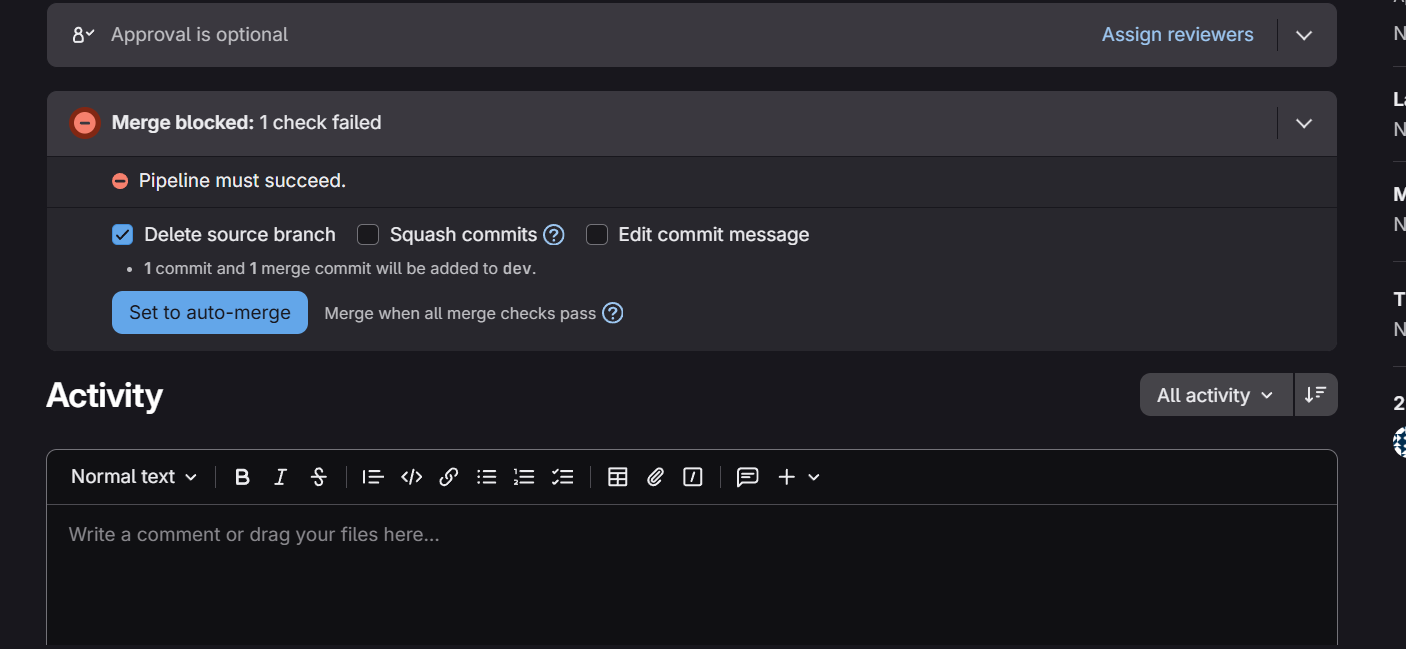
The following shows when a PR merge is blocked in GitLab.
Bitbucket
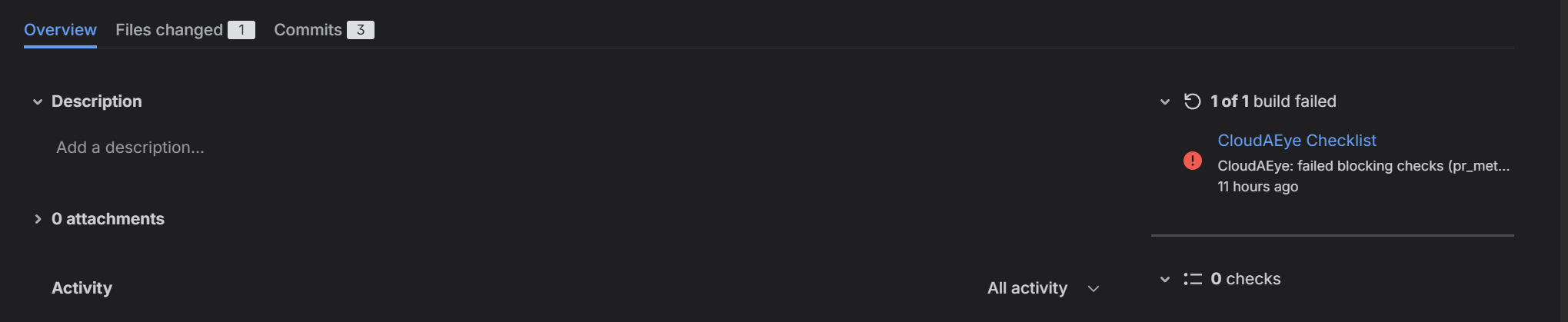
In Bitbucket, checklist failures are reported via commit status. Branch restriction is used to prevent merges. You need to be on the Bitbucket Premium plan for Branch restriction to be applied.
Here is an example of Commit Status:
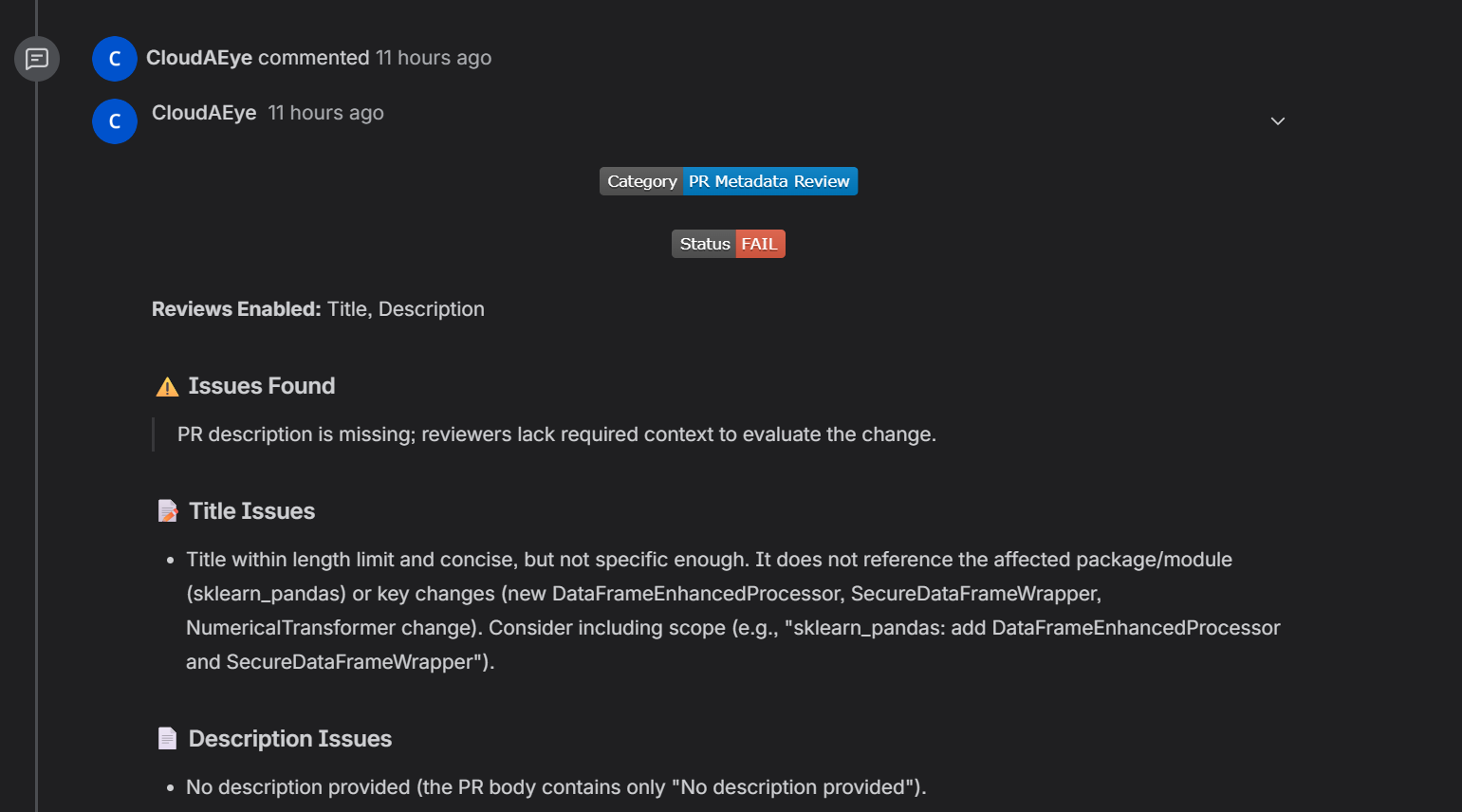
Individual check will show up as comments.
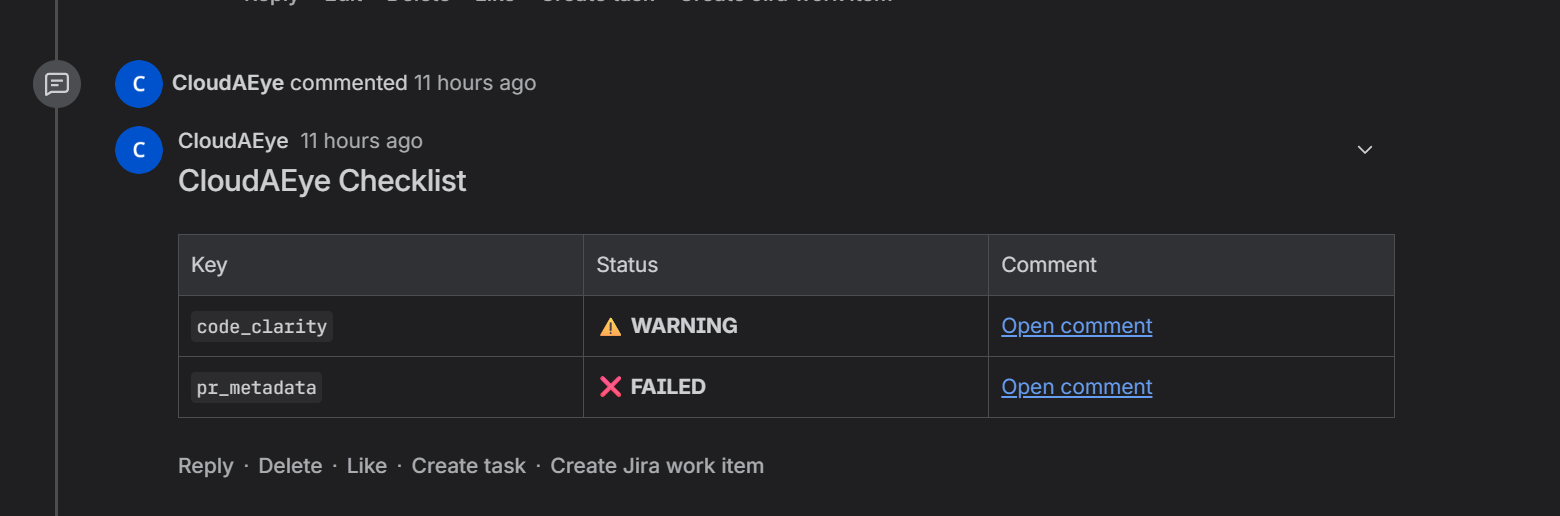
We have a table that summarizes all the check. Each entry links to individual comment.
How to Configure?
Each check supports two configurable enforcement modes:
- Warning: Displays warnings without blocking merges (default)
- Error: Blocks merges until the issue is resolved or manually overridden
Configuration
Configure for ALL Repositories
To configure PR Checklist, select Settings > Code Review Tab. You will see this page. Scroll down to selct from the prebuilt checklist items.
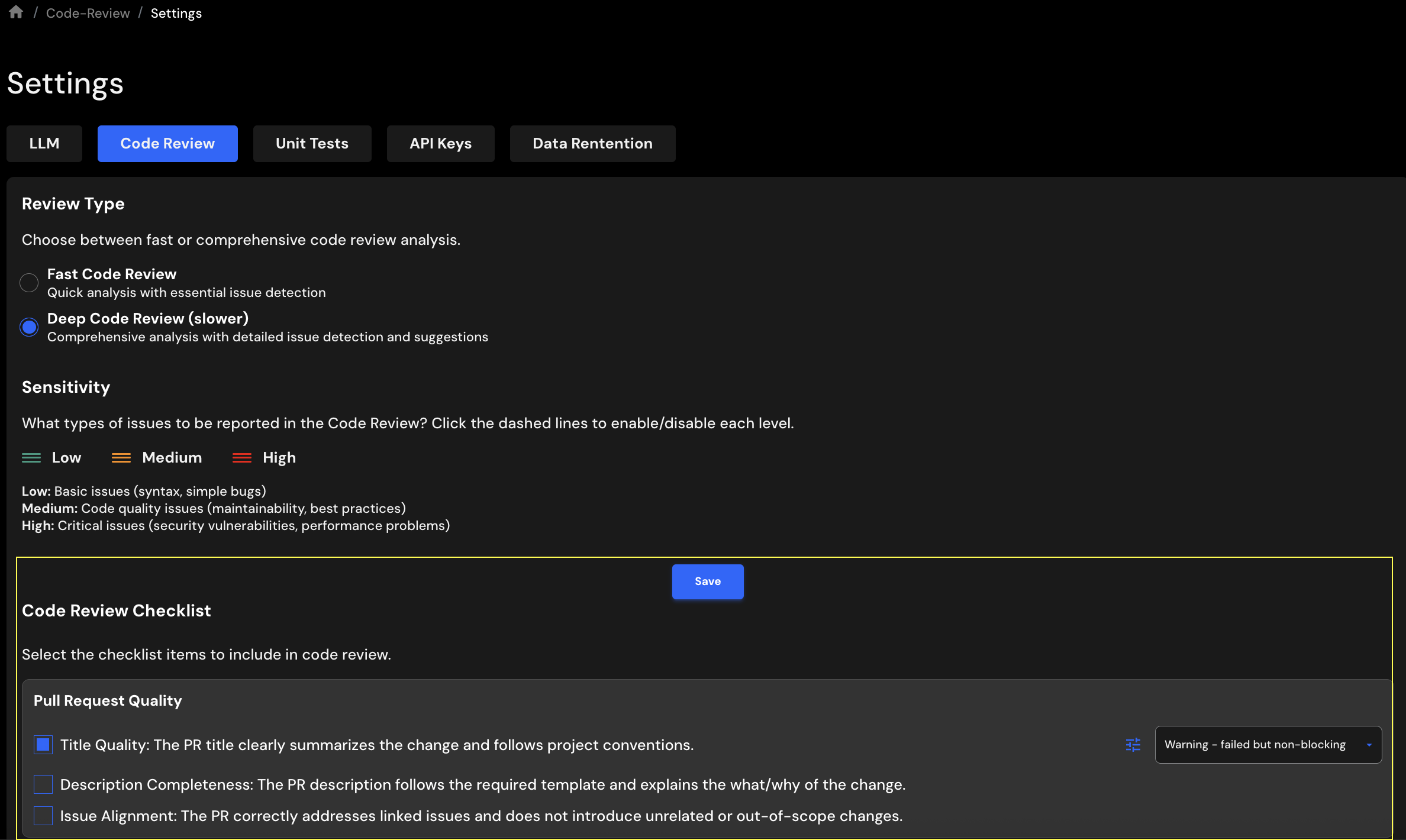
Select the checklist items, set each one to Warning or Error, and click Save Checklist to apply your changes.
Configure for One Repository
You may also configure PR Checklist at a repository level. To do that, go to Integrations > Repos (for GitHub/GitLab/Bitbucket). On GitHub, you will see this page.
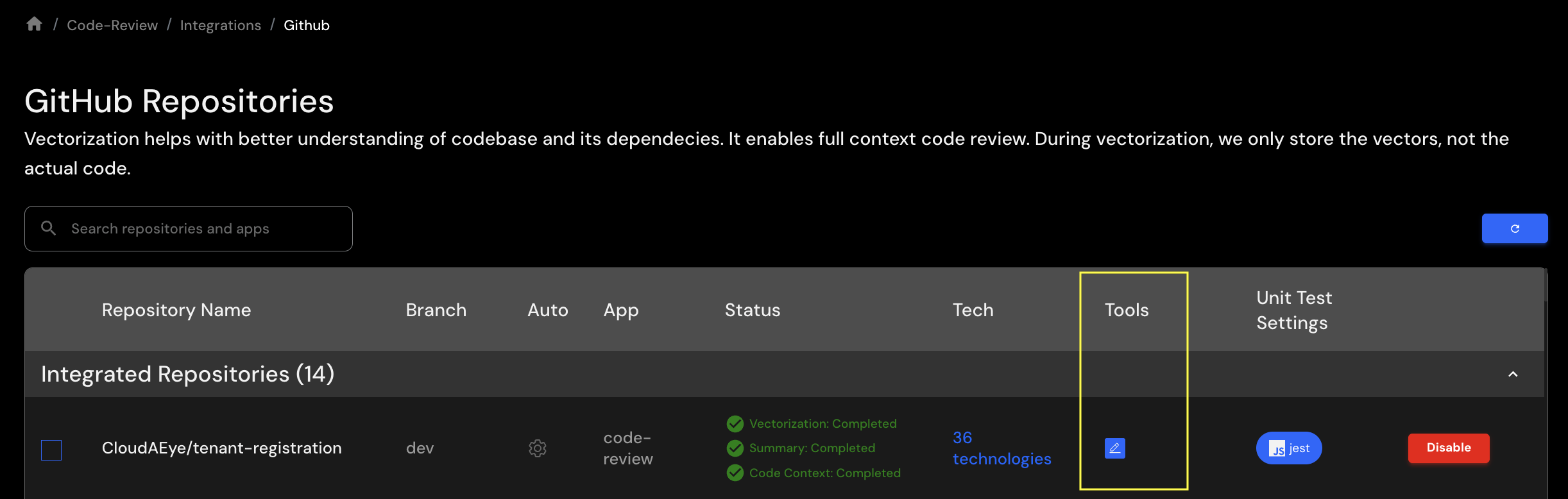
Click on the pencil icon under Tools column. Select PR Checklist tab. You will see a page with prebuilt checklists.
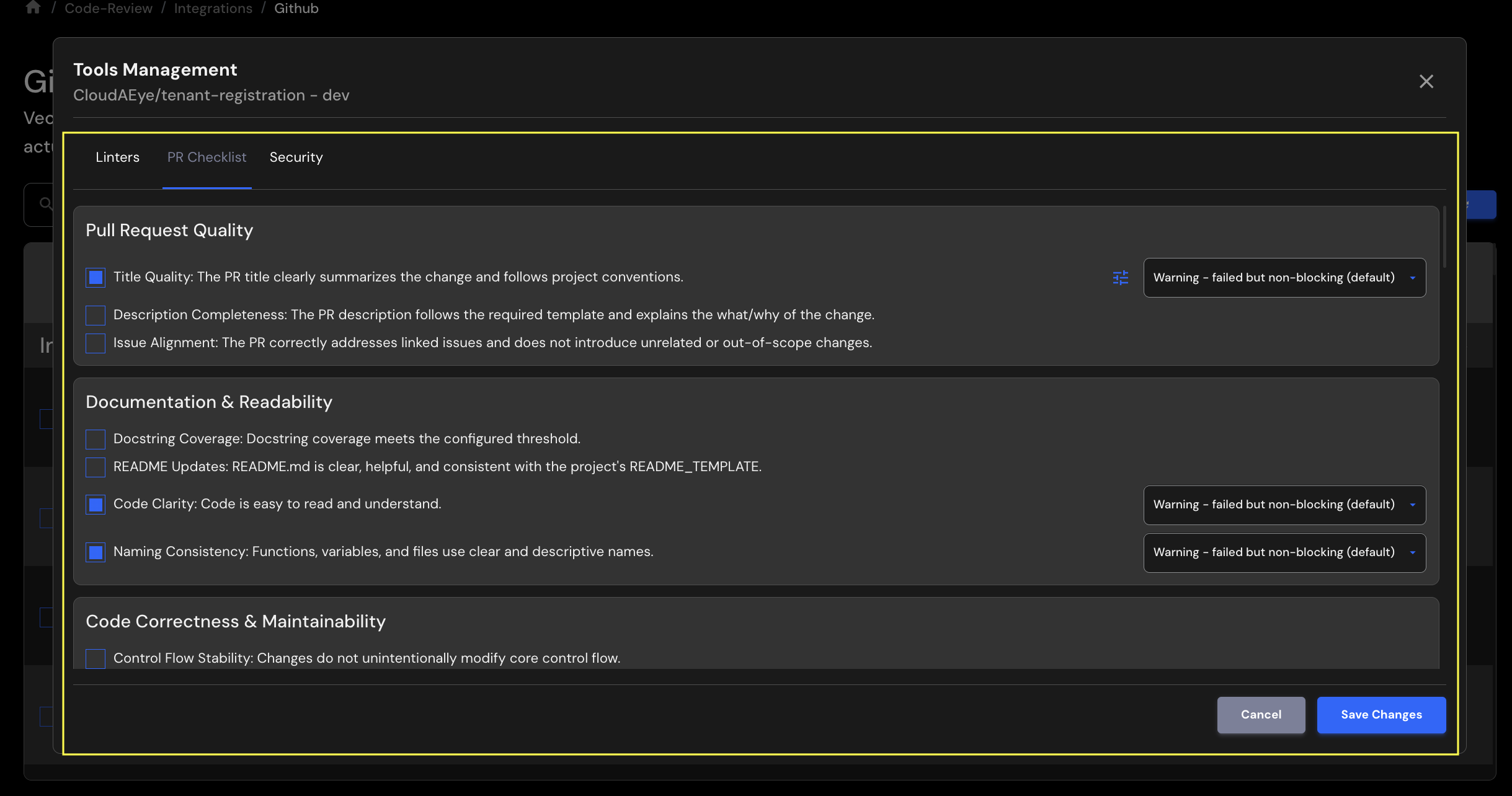
Select the checklist items, set each one to Warning or Error, and click Save Changes to apply your updates.
Configuration Hierarchy
When multiple configuration sources exist, they are applied in this order (last wins):
- Global settings (
Settings>Code Review) - Repository-level settings (
Integrations>Repos)
Ignore a Failed Check
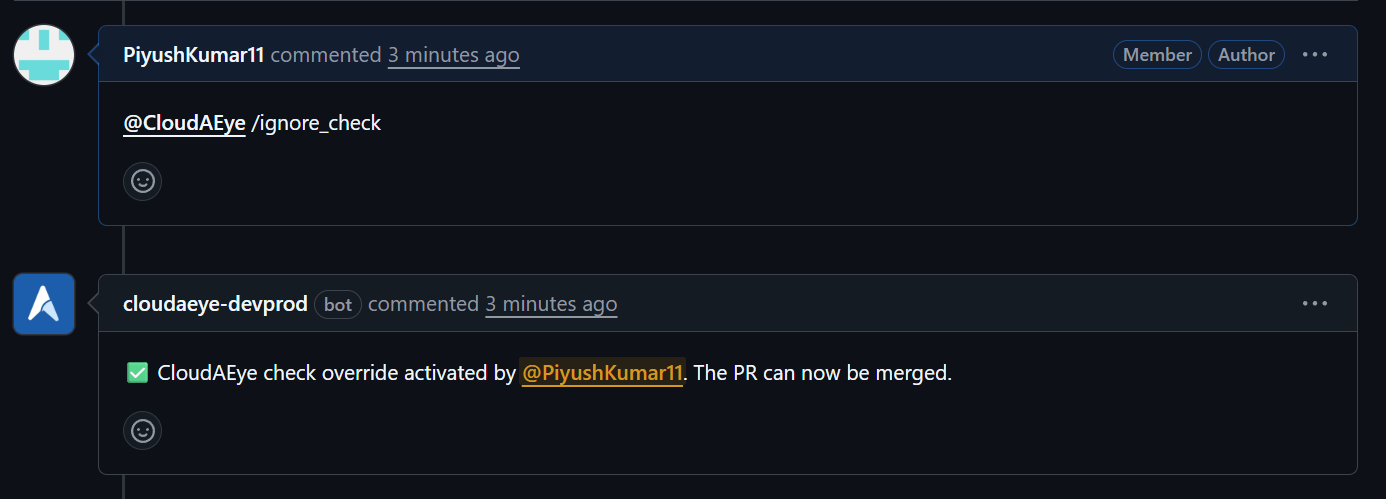
If a checklist item is set to Error, the pull request will be blocked from merging until the failure is resolved. To bypass this restriction, comment @cloudaeye /ignore_check.
This will update the check status to success, allowing you to merge your PR.
Prebuilt PR Checklists
CloudAEye offers over 75 prebuilt PR checklist items across 9 categories.
1. Pull Request Quality
- Title Quality: The PR title clearly summarizes the change and follows project conventions.
- Description Completeness: The PR description follows the required template and explains the what/why of the change.
2. Documentation & Readability
- Docstring Coverage: Docstring coverage meets the configured threshold (default 80%)
- README Updates: README.md is clear, helpful, and consistent with the project's README_TEMPLATE.
- Code Clarity: Code is easy to read and understand.
- Naming Consistency: Functions, variables, and files use clear and descriptive names.
3. Code Correctness & Maintainability
- Error Handling: Errors and exceptional cases are handled safely and predictably.
- Input Validation: Inputs are validated to prevent incorrect or unsafe usage.
- No Duplicate Code: Redundant or duplicated code (semantic or syntactic) has been removed.
- Function Signatures: Any updated function signatures are correct and consistently applied.
4. Testing & Quality Assurance
- Runtime Safety: Code is free from algorithmic or runtime errors.
- Edge Case Handling: Data and variable edge cases have been considered and tested.
- Style & Syntax Compliance: Code passes linting and adheres to project style guidelines.
- Unit Test Coverage: Unit test coverage meets the configured threshold (default 80%)
5. Dependencies & Packaging
- Dependency Declaration: Dependency and setup files (Dockerfile, requirements.txt etc) are correctly updated to support external libraries.
6. Security & Compliance
- No Secrets in Code: Secrets, API keys, or credentials are not exposed.
- Injection Protection: Code is safeguarded against SQL/NoSQL/command injection.
- Authentication & Authorization: Access controls are implemented correctly without bypass path
- Sensitive Data Handling: PII or sensitive data is not leaked in logs or request parameters.
- Safe Deserialization: Deserialization logic avoids insecure patterns.
- Security Misconfiguration: Lazy or overly permissive security settings that make your app easier to attack are not used.
- XML External Entity (XXE): Reading XML files without blocking external references that attackers can no longer use to steal sensitive files or make unauthorized requests.
7. LLM and Gen AI Apps Security
For RAG based LLM applications like chatbots, content generation, and Q&A systems WITHOUT autonomous agents.
- Prompt Injection: User prompts do not alter the LLM’s behavior or output in unintended ways.
- Sensitive Information Disclosure: Sensitive data included in prompts to external LLM APIs without redaction.
- Improper Output Handling: Insufficient validation, sanitization, and handling of the outputs generated by large language models before they are passed downstream to other components and systems.
- Excessive Agency: Does not enable damaging actions to be performed in response to unexpected, ambiguous, or manipulated outputs from an LLM.
- System Prompt Leakage: System prompts or instructions used to steer the behavior of the model are not inadvertently leaked.
- Vector and Embedding Weaknesses: Vectors and embeddings vulnerabilities are not present in systems utilizing Retrieval Augmented Generation (RAG) with Large Language Models (LLMs).
- Misinformation: Code can address situations where LLMs produce false or misleading information that appears credible.
- Unbounded Consumption: Large Language Model (LLM) application does not allow users to conduct excessive and uncontrolled inferences, leading to risks such as denial of service (DoS), economic losses, model theft, and service degradation.
8. Agentic Security
For autonomous AI agents that make decisions, use tools, and execute actions independently.
- Memory Poisoning: Prevent injection of malicious data into persistent agent memory that could corrupt behavior across sessions or agents.
- Tool Misuse: Adversarial tool misuse through chaining, privilege escalation, or execution of unintended actions is prevented.
- Privilege Compromise: Attackers can’t exploit implicit trust relationships between agents, tools, memory contexts, or task transitions to execute actions beyond intended permissions.
- Resource Overload: Attackers can’t exploit open-ended goals, long planning chains, or looping delegation to consume compute, memory, storage, or API credits.
- Cascading Hallucination: Hallucinations are prevented and can’t cascade into widespread misinformation, faulty decisions, or unsafe actions.
- Intent Breaking & Goal Manipulation: Prevent manipulation of agent goals or planning logic that could cause unintended actions.
- Repudiation & Untraceability: Code has proper traceability to reduce the risk of repudiation.
- Overwhelming Human-in-the-Loop: Agents may not flood users with requests, obscure critical decisions, or exploit approval fatigue.
- Unexpected RCE & Code Attacks: Exploit of code-generation features or embedded tool access to escalate actions into remote code execution (RCE), local misuse, or exploitation of internal systems is prevented.
- Agent Communication Poisoning: No injection of malicious content into inter-agent messages or shared communication channels, corrupting coordination, triggering undesired workflows, or manipulating agent responses.
- Rogue Agents in Multi-Agent Systems: Malicious, unauthorized, or compromised agents can’t embed themselves in a multi-agent system (MAS), influencing workflows, exfiltrating data, or sabotaging operations.
9. MCP Server
For building Model Context Protocol servers that integrate with AI tools.
Definition & Documentation:
- MCP Server Metadata: Server has a clear, descriptive name and purpose that helps users understand what it does.
- Tool Definitions: Each tool includes a clear explanation of what it does and when to use it.
- Resource Definitions: Data sources have clear descriptions and specify what format data is returned in.
- Prompt Definitions: Reusable prompts include clear instructions about what information they need.
- Parameter Descriptions: Every input field has a description explaining what values are valid and what format to use.
- Internal vs Client Descriptions: Documentation focuses on how to use features, not internal technical details.
- Naming Conventions: Tools, resources, and prompts use clear, descriptive names that make their purpose obvious.
Tool Parameter Handling:
- Type Annotations: All inputs specify what type of data they expect (text, numbers, lists, etc.).
- Optional vs Required: Clear indication of which inputs are mandatory and which have default values.
- Validation Constraints: User inputs are checked for valid values, proper formats, and safe ranges.
- Hidden Parameters: Sensitive information like API keys are injected securely, never exposed as user inputs.
- Complex Types: Complex inputs use well-defined structures instead of generic formats.
Tool Call Return Optimization:
- Async vs Sync: Tools use appropriate methods for fast vs slow operations (network calls, file operations).
- Return Type Validation: Outputs follow consistent, validated structures.
- Content Formatting: Different types of content (images, text, structured data) are returned in the correct format.
- Response Size: Large datasets are paginated or filtered to prevent overwhelming responses.
- Streaming Responses: Large data exports use incremental delivery for better performance.
Error Handling:
- Error Handling: Error messages are clear and helpful, without exposing technical internals.
- Internal Detail Masking: Detailed error information is logged for debugging while keeping user messages simple.
- Graceful Degradation: When optional features fail, the system continues working with reduced functionality.
- Timeout Handling: External operations have time limits and provide clear timeout messages.
Autonomous Tool Interactions:
- Tool Safety: Destructive operations (like deletes) are clearly marked and require confirmation.
- Tool Availability: Tools automatically enable/disable based on whether required dependencies are available.
- Tool Dependencies: Clear documentation of which tools depend on others.
- Rate Limiting: Protection against excessive requests to backend resources.
- Idempotency: Operations that can be safely retried are marked as such.
Sampling and Elicitation:
- Prompt Injection Protection: User inputs are properly separated from system instructions to prevent manipulation.
- LLM Response Validation: Responses from AI models are validated against expected formats before use.
- Client Authenticity: Server doesn't blindly trust client responses without validation.
- Elicitation Patterns: Complex requirements are broken into clear, step-by-step prompts.
- Context Management: Chat history is managed appropriately for context.
- Destructive Operation Elicitation: Destructive actions use interactive prompts to verify user intent.
Advanced Configuration
Some checklist items support additional configuration parameters beyond just Warning/Error mode. These advanced settings allow you to customize the behavior of specific checks to better match your team's requirements.
How to Access Advanced Configuration
When you select a checklist item that supports advanced configuration:
- Select the checklist item by checking its checkbox
- Choose enforcement mode (Warning or Error) from the dropdown
- Click the "Configure additional options" button that appears
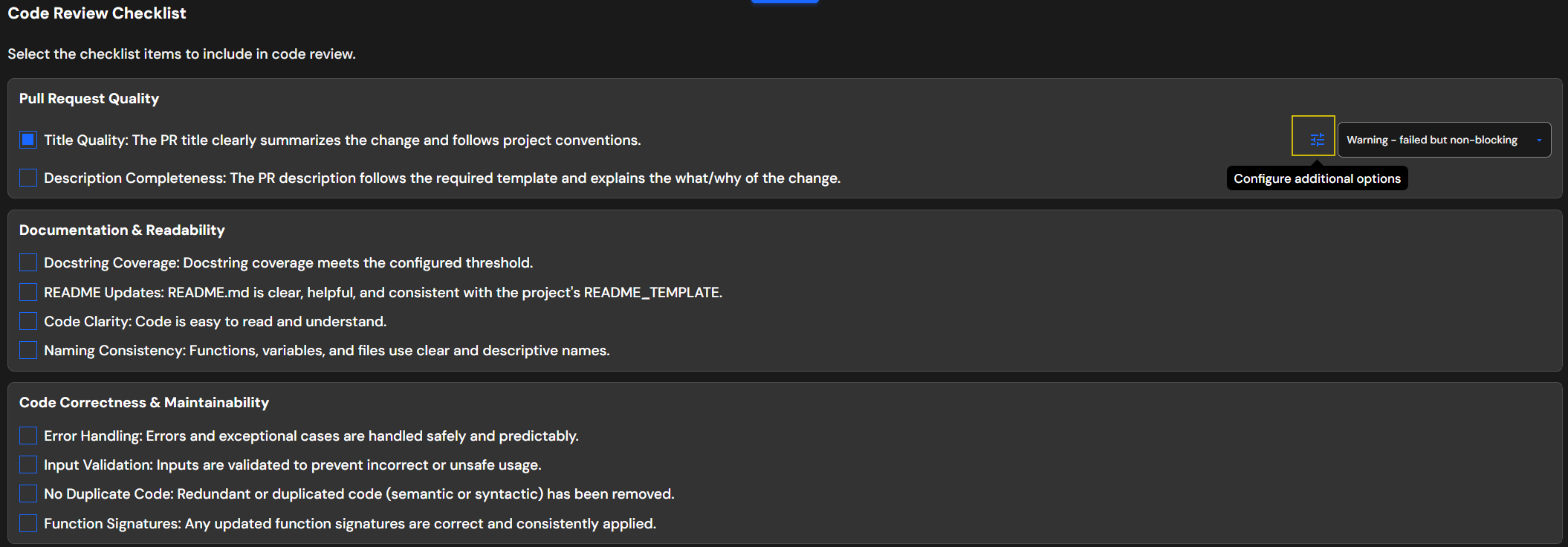
- A configuration dialog will open with available parameters
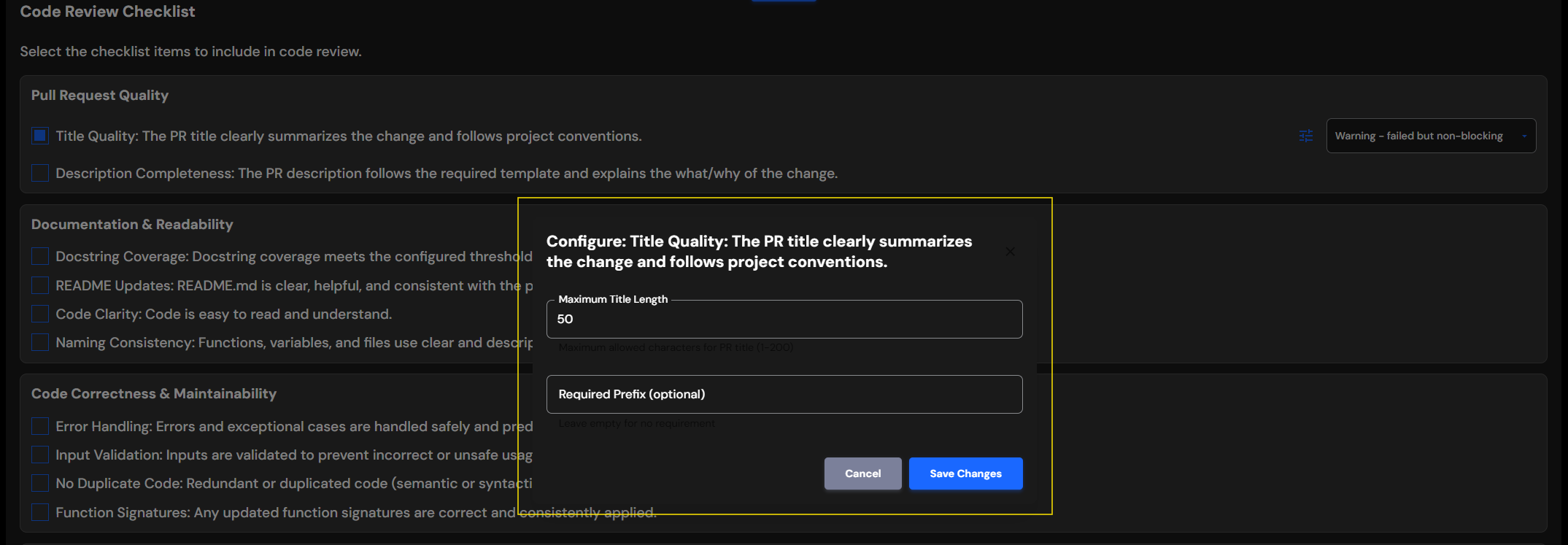
- Fill in your desired values
- Click "Save Changes" to apply
Available Advanced Parameters
Below are the configurable checklist items with their available parameters:
1. PR Quality
Title Quality
| Parameter | Type | Default | Description |
|---|---|---|---|
Maximum Title Length |
Integer | 50 | Maximum allowed characters for PR title |
Required Prefix |
String | Empty | Optional prefix for PR titles (e.g., "feat:", "fix:", "[TICKET-123]") |
Description Completeness
| Parameter | Type | Default | Description |
|---|---|---|---|
Description Template |
String | Empty | PR description template. Leave empty for no template requirement |
2. Documentation & Readability
Docstring Coverage
| Parameter | Type | Default | Description |
|---|---|---|---|
Threshold |
Integer (0-100) | 80 | Minimum docstring coverage percentage |
Scope |
String | "PR Changes Only" | Scope of coverage check. Options: "PR Changes Only" or "Entire Codebase". "PR Changes Only" checks only changed files for generating coverage numbers |
Exclude Patterns |
Array of Strings | Empty | File patterns to exclude from coverage calculation (e.g., ["test_*", "*/migrations/*"]) |
README Updates
| Parameter | Type | Default | Description |
|---|---|---|---|
README Template |
String | Empty | README template to validate against. If provided, acts as an implicit trigger requiring README updates |
Check Code Examples |
Boolean | false | Whether to verify that code examples are present and correct for new features |
Trigger Patterns |
Array of Strings | ["public API changes", "CLI changes", "configuration changes", "installation changes", "new features"] | Types of changes that require README updates |
3. Testing & Quality Assurance
Unit Test Coverage
| Parameter | Type | Default | Description |
|---|---|---|---|
Threshold |
Integer (0-100) | 80 | Minimum test coverage percentage |
Scope |
String | "PR Changes Only" | Scope of coverage check. Options: "PR Changes Only" or "Entire Codebase". "PR Changes Only" checks only changed files for generating coverage numbers |
Test Patterns |
Array of Strings | Empty | Patterns to locate test files (e.g., ["test_*", "*_test.py", "tests/*"]) |
Exclude Patterns |
Array of Strings | Empty | File patterns to exclude from coverage calculation |
4. Dependencies & Packaging
Dependency Declaration
| Parameter | Type | Default | Description |
|---|---|---|---|
Dependency Files |
Array of Strings | Empty | List of dependency file paths to check (e.g., ["requirements.txt", "pyproject.toml", "package.json"]) |
Require Version Pin |
Boolean | false | Whether to require specific version numbers |
Tips for Configuration
Start Conservative: Begin with lower thresholds (e.g., 50%) for coverage and gradually increase as your team adapts.
Exclude Strategically: Exclude patterns allow you to skip certain files from coverage checks. This is useful for generated files, test fixtures, migrations, and other files that don't need documentation or testing.
How File Patterns Work:
Exclude/test patterns use glob-style matching with support for wildcards:
| Pattern Type | Example | What It Matches | Use Case |
|---|---|---|---|
| Exact filepath | setup.py |
Only setup.py in the root directory |
Exclude specific config files |
| Wildcard in filepath | tests/test_*.py |
tests/test_foo.py, tests/test_bar.py |
Locate test Python files with prefix in tests directory |
| Extension match | *.min.js |
All minified JavaScript files | Exclude minified/compiled code |
| Directory wildcard | migrations/* |
All files in migrations/ folder |
Exclude entire directory |
| Recursive wildcard | **/migrations/* |
All files in any migrations/ folder at any depth |
Exclude pattern across all subdirectories |
| Multiple wildcards | **/tests/test_*.py |
tests/test_foo.py, src/utils/tests/test_bar.py |
Include all Python test files across all subdirectories |
README Triggers: Include patterns that affect end users: "API changes", "breaking changes", "new features". Exclude internal refactoring: avoid "code cleanup", "internal changes".
Version Pinning: Enable Require Version Pin for production applications. Disable for libraries to allow flexibility for downstream users.