Chat with Code
Overview
Chat with Code gives every developer a senior engineer to ask about your codebase. Ask a question in plain language, across all of your repositories or just one, and CodeCortex investigates the code and returns a clear, detailed answer.
You can follow the investigation as it happens: CodeCortex shows its plan and every step it takes, so you see exactly how it reached its answer.
Use it to:
- Onboard to an unfamiliar codebase.
- Find where a feature or behavior is implemented.
- Trace a request or an error across services and repositories.
- Understand why code behaves the way it does before you change it.
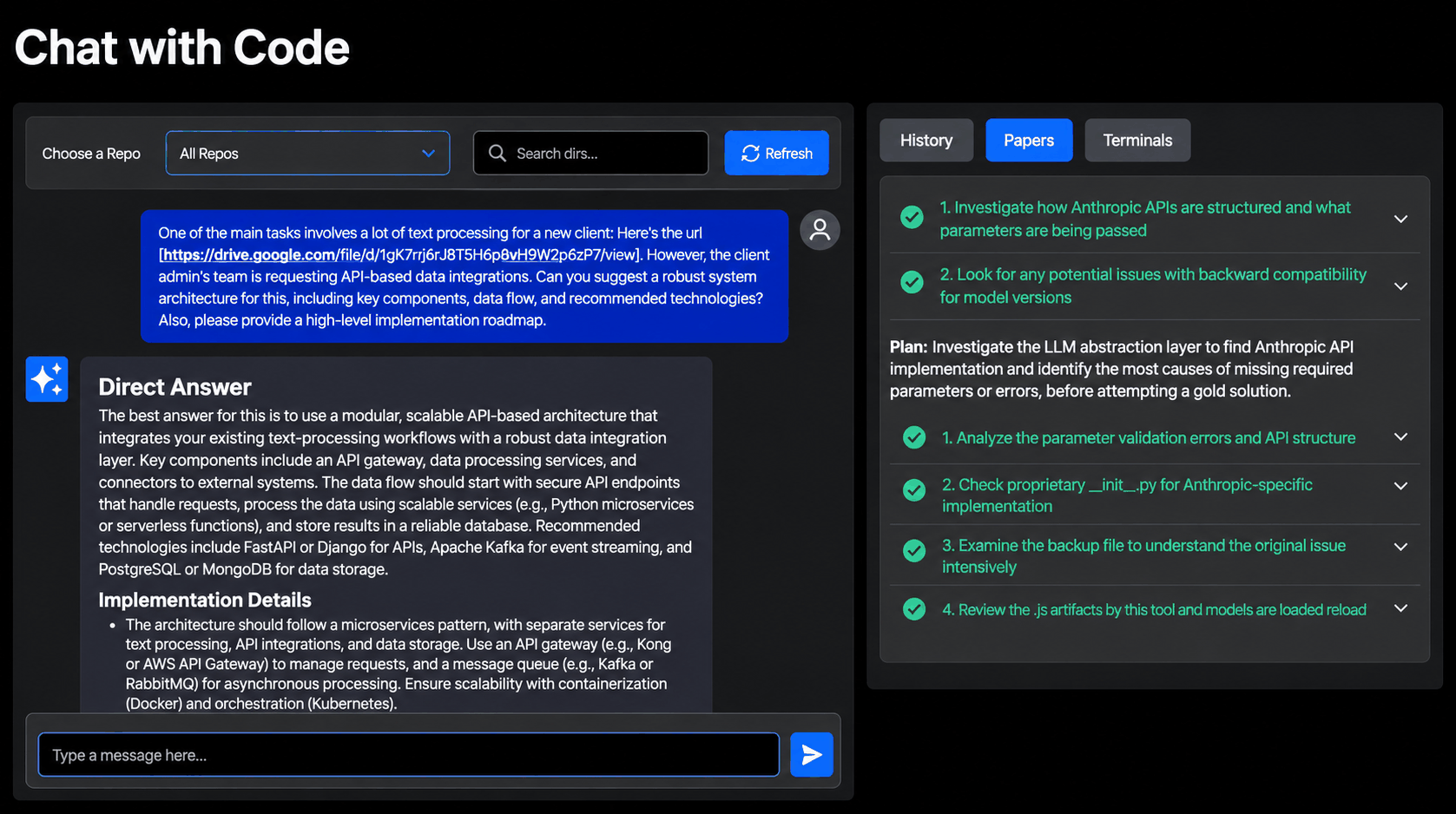
The page has two parts:
- The conversation, on the left. Choose a repository at the top, or leave it at All Repos, and type your question in the box at the bottom. Each answer starts with a Direct Answer, followed by sections such as Implementation Details.
- The investigation, on the right. CodeCortex's plan and each step it takes, with a check mark as each step completes. Expand a step to see what CodeCortex looked at.
Prerequisites
Step 1: Set Up CodeCortex
Set up CodeCortex by following the Overview guide.
Step 2: Connect Your Repositories
Connect your repositories from GitHub, GitLab, or Bitbucket. You can add repositories during setup, or later from Integrations in the CodeCortex sidebar.
Ask a Question
Step 1: Open Chat with Code
In the CloudAEye console, select Chat with Code in the CodeCortex sidebar.
Step 2: Choose a Repository
Use the Choose Repo drop-down at the top of the page:
| Option | When to use it |
|---|---|
| All Repos (default) | The question spans several services, or you're not sure where the answer is. CodeCortex searches across all of your repositories. |
| A single repository | You know which repository the answer is in, and want a focused answer. |
Choosing a different repository starts a new conversation.
Step 3: Ask Your Question
Type your question in the box at the bottom of the page and send it. For example:
Which services manage user authentication?
The panel on the right shows CodeCortex's progress, and the answer appears in the conversation.
Step 4: Ask Follow-Up Questions
Ask follow-up questions in the same conversation. Each follow-up builds on the earlier answers, so you can go deeper step by step.
To start a new conversation, select the reset button next to the search box.
Tips for Great Answers
- Start broad, then narrow. Ask across All Repos to find where something lives, then select that repository to go deeper.
- Be specific. Name the function, class, endpoint, or error message you're asking about.
- Ask one thing at a time, and build on the answer with follow-up questions.
Follow the Investigation
The panel on the right shows how CodeCortex answers your question. Switch between its tabs at any time:
| Tab | What it shows |
|---|---|
| Planner | The plan CodeCortex makes for your question, with each step marked as it completes. |
| Steps | Each step of the plan, and what CodeCortex did in it. |
| Terminal | The activity from every step, in one view. |
Read the Answer
Each answer starts with a short Direct Answer, followed by the details: the implementation, the files and functions involved, and how data flows between them.
When you ask across All Repos, the answer can connect behavior across repositories, such as a change in one service that affects another.
To find an earlier question in a long conversation, type in the Search chat box at the top of the page.
Example: Find the Root Cause of an Outage
A developer gets an alert that an API is returning errors, and doesn't know where to start. They find the root cause with two questions:
-
A "where" question across all repositories. With Choose Repo set to All Repos, they ask:
What could cause a 500 error on /api/users?CodeCortex traces the request across two services, and finds that one service calls the other without a required parameter.
-
A "what" question to one repository. They select the repository CodeCortex pointed to, and ask:
How is the user service client created, and what value does the timeout parameter get when it isn't set?The answer shows that the parameter is left empty, which is the root cause.
The developer makes the fix, opens a pull request, and comments @cloudaeye /review to review the change. For the full story, see the blog post From Panic to Pull Request.
Example Questions
Onboarding
- "What are the main services in this codebase, and how do they communicate?"
- "Where is the entry point for the payments API?"
- "How do I add a new endpoint that follows the existing patterns?"
Understanding code
- "Which modules call
LedgerEntry.post()?" - "How are failed refunds retried?"
- "What happens when the payment provider times out?"
Debugging
- "Why is this function returning null?"
- "Which edge cases might this validation logic miss?"
- "Where is this error message raised, and what triggers it?"
Related Features
- Enterprise Search: Ask questions across Google Drive, OneDrive, YouTube, and Jira.
- Issue Explainer (
/explain): Get a step-by-step implementation guide for a GitHub issue or Jira ticket. - Codebase Q&A (
/ask): Ask about the code changes in a pull request.