Control Flow Analysis
This guide explains how CloudAEye analyzes changes to the control flow of a pull request.
Overview
CloudAEye shows how a code change affects the order in which functions and services are called when you comment @cloudaeye /control_flow in the PR timeline.
The report includes before-and-after sequence diagrams and highlights calls that were added, removed, redirected, or moved. It also identifies affected callers in other connected repositories.
Prerequisites
Step 1: Register
Sign up with CloudAEye SaaS.
Step 2: Setup Code Review
Setup Code Review by following the Getting Started guide.
Analyze Control Flow
To analyze the control flow of your pull request, comment the following in the PR timeline:
@cloudaeye /control_flow
CloudAEye analyzes the code changes and adds a control flow report to the pull request.
Control Flow Report
The report includes:
- A summary of how the code change affects the flow.
- The selected flow and its call sequence.
- Before-and-after sequence diagrams.
- Calls that moved to a different branch or into a loop.
- Changes in other flows that are not shown in the diagrams.
- Affected callers and search coverage across connected repositories.
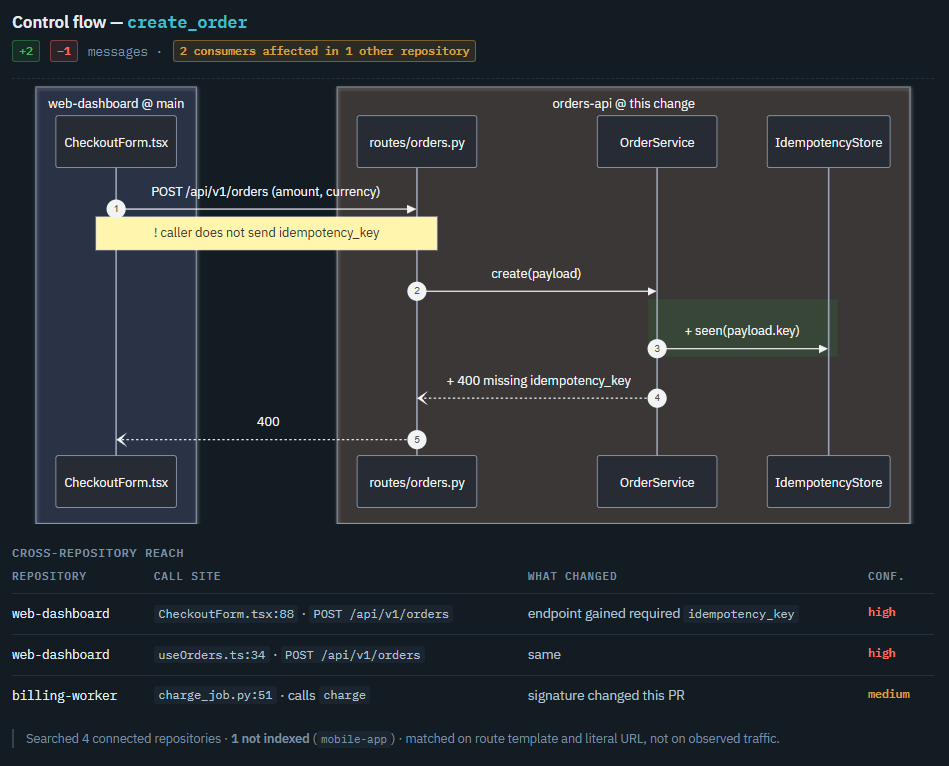
Call Markers
The diagrams use the following markers to identify changes:
| Marker | Description |
|---|---|
+ |
Added call |
- |
Removed call |
~ |
Call redirected to a different target |
! |
Call moved to a different place |
| Dashed arrow | A call whose target could not be resolved |
A moved call can change when or how often code runs. For example, moving a call inside a loop makes it run for each iteration.
The diagrams show the code's structure, not a runtime trace. Use Review Code to check whether the code changes are correct.